For most sim racers, I’d start with the Logitech G RS50 8 Nm Direct Drive: its direct-drive force feedback makes it the strongest all-around choice in this lineup. The Logitech G29 is a more approachable option with a familiar wheel-and-pedal setup, while the PXN V99 adds force feedback, pedals, and a shifter for buyers seeking a fuller kit. The main tradeoffs are force-feedback quality, platform compatibility, mounting needs, and how much control you want over the car. A basic wheel can suit casual play, but a stronger system asks more of your desk or cockpit. Continue reading for the full breakdown and a guide to choosing among these racing simulator steering wheels.

Play games on Amazon Luna for your game nights, included with Prime
- A rotating selection of games, no download needed
- Play on TV, laptop or phone
- Fast, free delivery for your gear, too
Complete the kit



Key Takeaways
- Direct drive is the clearest performance step up: the Logitech G RS50 models lead this lineup for force-feedback strength, but require more commitment to setup and mounting than entry-level wheels.
- The G29 remains a sensible middle ground: it offers a recognizable wheel-and-pedal package without the direct-drive demands of the RS50.
- The PXN V99 bundles more controls: its force feedback, pedals, and shifter can make it appealing as a more complete kit, though buyers should confirm platform compatibility before ordering.
- Not every wheel here is built for force feedback: options such as the HORI Apex and Overdrive suit simpler play, but they do not offer the same feedback experience as the force-feedback picks.
- Several listings overlap or duplicate models: the PXN V9 Gen2 and V9 GEN2, the V99 listings, and the two V3 Pro entries call for careful model and bundle checks rather than treating every listing as a distinct design.
| Gamrombo 11-Inch Racing Wheel Set for PS5, PS4, and PC |  | Best Feature-Packed Non-Force-Feedback Bundle | Compatibility: PC, PlayStation 4, PlayStation 5 | Connectivity: USB | Wheel size: 11 inches | VIEW LATEST PRICE | See Our Full Breakdown |
| PXN V9 GEN2 Gaming Steering Wheel for PC, PlayStation, and Xbox |  | Best for Broad Platform Compatibility | Compatible devices: PC, PS3, PS4, Xbox One, Xbox Series X|S | Connectivity: USB | Steering rotation: 270° or 900° | VIEW LATEST PRICE | See Our Full Breakdown |
| PXN V99 3.2 Nm Force Feedback Racing Wheel with Pedals and Shifter |  | Best for Entry-Level Force Feedback | Force feedback torque: Up to 3.2 Nm | Wheel diameter: 11.8 inches | Steering rotation: 270° or 900° | VIEW LATEST PRICE | See Our Full Breakdown |
| Logitech G29 Driving Force Racing Wheel and Pedals | 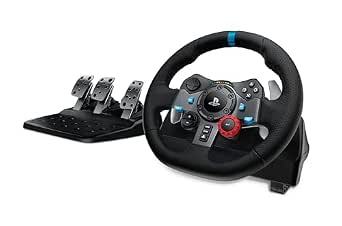 | Best for PlayStation and PC Force-Feedback Reliability | Compatible devices: PC, PlayStation 5, PlayStation 4, Mac | Connectivity: USB | Rotation: 900 degrees | VIEW LATEST PRICE | See Our Full Breakdown |
| HORI Racing Wheel Apex for PlayStation 5, PlayStation 4, and PC |  | Best Beginner-Friendly PlayStation Wheel | Compatible platforms: PlayStation 5, PlayStation 4, PC | Connectivity: USB | Rotation: 270° or 180° | VIEW LATEST PRICE | See Our Full Breakdown |
| Logitech G RS50 8 Nm Direct Drive TRUEFORCE Racing Wheel for PS5, PS4, and PC |  | Best Direct-Drive Upgrade | Peak torque: 8 Nm | Wheel diameter: 11 inches | Feedback: Direct drive with TRUEFORCE | VIEW LATEST PRICE | See Our Full Breakdown |
| PXN V3 Pro Gaming Steering Wheel with Pedals |  | Best for Casual Multi-Platform Play | Wheel diameter: 10.24 inches | Feedback: Dual-motor vibration | Shifting: Integrated sequential shifter and dual paddle shifters | VIEW LATEST PRICE | See Our Full Breakdown |
| PXN V9 Gen2 Racing Wheel with 270°/900° Steering |  | Best Feature-Rich Starter Bundle | Steering angles: 270° and 900° | Shifter: 6+1, including reverse | Pedals: Three Hall-effect pedals | VIEW LATEST PRICE | See Our Full Breakdown |
| PXN V99 Force Feedback Racing Wheel with Pedals and Shifter |  | Best Complete Force-Feedback Bundle | Force feedback: 3.2 Nm dual-motor | Steering rotation: 270° or 900° | Wheel diameter: 11.8 inches | VIEW LATEST PRICE | See Our Full Breakdown |
| PXN V3 Pro Gaming Steering Wheel with Pedals |  | Best Compact Desk Setup | Wheel diameter: 10.24 inches | Feedback: Dual-motor vibration | Controls: 17 buttons, sequential shifter, and paddle shifters | VIEW LATEST PRICE | See Our Full Breakdown |
| Logitech G923 TRUEFORCE Racing Wheel and Pedals for PlayStation 5, PlayStation 4, and PC |  | Best for Detailed Feedback Across PlayStation and PC | Compatible platforms: PlayStation 5, PlayStation 4, PC | Force feedback: TRUEFORCE high-definition feedback; processing up to 4,000 times per second | Wheel cover: Hand-stitched black leather | VIEW LATEST PRICE | See Our Full Breakdown |
| HORI Racing Wheel Overdrive for Xbox Series X|S |  | Best Adjustable Starter Wheel for Xbox | Compatible devices: Xbox Series X|S, Xbox One, Windows 10 | Connectivity: USB | Steering range: 270° or 180° | VIEW LATEST PRICE | See Our Full Breakdown |
| Logitech G RS50 Direct Drive Racing Wheel System for PC |  | Best Premium Direct-Drive PC System | Compatibility: Windows 10/11 PC | Peak torque: 8 Nm | Maximum steering angle: 2700° | VIEW LATEST PRICE | See Our Full Breakdown |
| racing simulator steering wheel | Connectivity | Pedals | Compatibility |
|---|---|---|---|
| Gamrombo 11-Inch Racing Wheel | USB | Three Hall-effect pedals with linear brake | PC, PlayStation 4, PlayStation 5 |
| PXN V9 GEN2 Gaming Steering Wh | USB | Hall-effect sensors, textured surfaces, anti-slip design | — |
| PXN V99 3.2 Nm Force Feedback | Wired USB | Hall-effect throttle, brake, and clutch | — |
| Logitech G29 Driving Force Rac | USB | Adjustable, pressure-sensitive pedals | — |
| HORI Racing Wheel Apex for Pla | USB | — | — |
| Logitech G RS50 8 Nm Direct Dr | USB | — | PlayStation 5, PlayStation 4, Windows 10/11 PC |
| PXN V3 Pro Gaming Steering Whe | — | Foldable gas and brake pedals | PC, PS4, PS3, Xbox One, Xbox Series X|S, Switch |
| PXN V9 Gen2 Racing Wheel with | USB | Three Hall-effect pedals | Windows 7–11 PC, PS3, PS4, Xbox One, Xbox Series X|S |
| PXN V99 Force Feedback Racing | USB | Three, Hall magnetic sensor | PC, PS4, Xbox One, Xbox Series X|S |
| PXN V3 Pro Gaming Steering Whe | — | Foldable gas and brake pedals | PC, PS3, PS4, Xbox One, Xbox Series X|S, Nintendo Switch |
| Logitech G923 TRUEFORCE Racing | — | Progressive brake pedal; polished metal finish | — |
| HORI Racing Wheel Overdrive fo | USB | — | — |
| Logitech G RS50 Direct Drive R | — | — | Windows 10/11 PC |
More Details on Our Top Picks
Gamrombo 11-Inch Racing Wheel Set for PS5, PS4, and PC
The Gamrombo makes the most sense for buyers who want a complete wheel, three-pedal, and shifter setup without stepping up to the PXN V99’s force feedback. Its 120°–900° steering range lets you choose a quicker response for arcade driving or a wider turn for more measured control, while Hall-effect pedals and customizable buttons add useful tuning options. The hand-stitched PU leather rim and RGB lighting give it a more dressed-up feel than a bare-bones starter wheel. The tradeoff is that its spring-driven mechanism does not reproduce road forces like the V99 or Logitech G29. Also, the shifter must be connected for the wheel to operate, and vibration works on PC but not PS5 or PS4. I’d pick it for its included controls, not for force-feedback realism.
Pros:- Three Hall-effect pedals include a linear brake.
- Steering angle adjusts from 120° to 900° with sensitivity settings.
- Hand-stitched PU leather rim and customizable button mapping.
- Includes a gear shifter and adds dual-motor vibration on PC.
Cons:- The wheel requires the gear shifter to be connected to operate.
- No vibration feedback on PS5 or PS4.
- Spring-driven steering cannot match the force feedback of the PXN V99 or Logitech G29.
Best for: PC or PlayStation buyers who want a bundled shifter and three pedals, plus adjustable steering, without prioritizing force feedback.
Not ideal for: Drivers seeking road-force feedback or a simple plug-in wheel; the shifter is required for operation, and console vibration is unavailable.
- Compatibility:PC, PlayStation 4, PlayStation 5
- Connectivity:USB
- Wheel size:11 inches
- Steering angle:120°–900°; preset options include 270° and 900°
- Pedals:Three Hall-effect pedals with linear brake
- Vibration:Dual-motor vibration on PC; not supported on PS5 or PS4
- Lighting:RGB, six colors and two dynamic effects
- Included components:Racing wheel, foot pedal, and gear shifter
Our verdict“Choose the Gamrombo if you want a bundled shifter and three pedals for PC or PlayStation, but skip it if force feedback is a priority.”
PXN V9 GEN2 Gaming Steering Wheel for PC, PlayStation, and Xbox
The PXN V9 GEN2 stands out for covering PC, PlayStation, and Xbox with one wheel, making it a flexible choice for households that switch between platforms. Its 270°/900° rotation, magnetic encoder, Hall-effect pedals, paddle shifters, and 6+1 shifter provide more control options than the HORI Racing Wheel Apex, which has no shifter listed. App-based settings and 19 buttons also give it room to adapt across games. That breadth comes with setup caveats: PS4 and Xbox use requires the original controller to connect to the wheel base, and a game may not support the shifter in every vehicle. Unlike the force-feedback PXN V99, this model’s dual vibration motors do not provide the same force-feedback steering response. I’d favor it when platform coverage and included controls matter more than force-feedback realism.
Pros:- Compatible with PC, PS3, PS4, Xbox One, and Xbox Series X|S.
- Offers 270° or 900° steering with a 16-bit magnetic encoder.
- Includes Hall-effect pedals, paddle shifters, and a 6+1 shifter.
- App settings, 19 buttons, and dual vibration motors add configuration options.
Cons:- PS4 and Xbox use requires the original controller to be connected to the wheel base.
- Shifter support depends on the game and selected vehicle.
- Vibration motors are not a substitute for the PXN V99’s force feedback.
Best for: Players using a mix of PC, PS3 or PS4, and Xbox One or Series X|S who want both paddle shifts and a separate shifter.
Not ideal for: Console players who want a straightforward standalone connection, or sim racers who want force feedback like the PXN V99.
- Compatible devices:PC, PS3, PS4, Xbox One, Xbox Series X|S
- Connectivity:USB
- Steering rotation:270° or 900°
- Encoder:16-bit magnetic encoder
- Shifter:6+1 gear shifter with two customizable buttons and handbrake function
- Pedals:Hall-effect sensors, textured surfaces, anti-slip design
- Controls:19 buttons and dual paddle shifters
- Shifter clamp compatibility:Tables up to 4.5 cm thick
Our verdict“Pick the V9 GEN2 for cross-platform flexibility and bundled shifting controls, provided you’re comfortable with its console pairing requirement.”
PXN V99 3.2 Nm Force Feedback Racing Wheel with Pedals and Shifter
The PXN V99 earns its place by bringing up to 3.2 Nm of force feedback to a package that also includes a three-pedal set and 6+1 H-pattern shifter. That changes the driving experience more than lighting or extra button options: steering can respond to cornering and road texture, unlike the spring-driven Gamrombo. Its 270° or 900° rotation and app adjustments for feedback, pedal response, and button mapping give buyers ways to tailor the setup as they move between driving styles. It is not the stronger, direct-drive alternative to the Logitech G RS50; it is a wired, console-compatible package with more modest force feedback. Console pairing requires an original controller, and the USB connection keeps the rig tethered. I’d choose it for a first force-feedback setup that includes the core shifting hardware.
Pros:- Force feedback delivers steering responses to road texture, cornering, and braking.
- Includes Hall-effect throttle, brake, and clutch pedals.
- A 6+1 H-pattern shifter is included.
- App supports adjustments to feedback, steering angle, pedal response, and button mapping.
Cons:- Console pairing requires an original controller.
- Wired USB limits placement and keeps the setup tethered.
- Its 3.2 Nm force feedback is a step below the Logitech G RS50’s 8 Nm direct-drive system.
Best for: PC, PS4, or Xbox players moving beyond a basic spring-driven wheel and wanting force feedback, three pedals, and an H-pattern shifter together.
Not ideal for: Buyers seeking high-torque or direct-drive feedback, or console users who do not want to connect an original controller.
- Force feedback torque:Up to 3.2 Nm
- Wheel diameter:11.8 inches
- Steering rotation:270° or 900°
- Pedals:Hall-effect throttle, brake, and clutch
- Shifter:6+1 H-pattern
- Programmable buttons:13
- Connectivity:Wired USB
- Compatible devices:Windows 7/8/10/11 PC, PS4, Xbox One, Xbox Series X|S
Our verdict“Choose the V99 if you want a complete, console-compatible force-feedback starter rig, but look to the Logitech G RS50 for substantially stronger direct-drive force.”
Logitech G29 Driving Force Racing Wheel and Pedals
The Logitech G29 is the most balanced pick here for a buyer who wants force feedback and 900-degree steering from a familiar PlayStation-and-PC wheel. Its dual-motor feedback adds steering resistance and road response that the HORI Racing Wheel Apex does not offer, while the hand-stitched leather cover, steel components, and helical gears point to a more substantial build than the budget-oriented options. Pressure-sensitive pedals also help braking feel more controlled than simple on-off inputs. The main compromise is the bundle: the six-speed shifter is optional, so buyers wanting a complete manual-shifting setup need to add it separately. Compared with the PXN V99, the G29 has a more limited platform list and lacks an included H-pattern shifter, but it remains a strong fit for PS5, PS4, and supported PC games.
Pros:- Dual-motor force feedback provides steering and road-response cues.
- 900-degree rotation supports broader steering movement.
- Hand-stitched leather cover and steel components give the wheel a substantial build.
- Adjustable, pressure-sensitive pedals support responsive braking.
Cons:- The optional six-speed shifter is sold separately.
- Compatible platforms are limited to PC, PS5, PS4, and Mac rather than Xbox.
- The PXN V99 includes a three-pedal set and H-pattern shifter in its package.
Best for: PlayStation 5 or PS4 drivers and PC players who want 900-degree steering, dual-motor force feedback, and a leather-covered wheel.
Not ideal for: Xbox users or buyers who want a shifter included; the optional six-speed attachment is sold separately.
- Compatible devices:PC, PlayStation 5, PlayStation 4, Mac
- Connectivity:USB
- Rotation:900 degrees
- Force feedback:Dual-motor
- Buttons:16
- Pedals:Adjustable, pressure-sensitive pedals
- Weight:5 pounds
- Dimensions:10.24 × 10.94 × 10.63 inches
Our verdict“The G29 is a strong choice for PS5, PS4, and PC drivers who value force feedback and a leather-covered wheel, but manual-shift buyers must add the shifter separately.”
HORI Racing Wheel Apex for PlayStation 5, PlayStation 4, and PC
The HORI Racing Wheel Apex is the straightforward choice for PlayStation or PC players who want a full-size wheel and pedal set without the extra hardware in the Gamrombo or PXN V9 GEN2 bundles. Its adjustable 270° or 180° rotation, pedal sensitivity, and dead-zone controls let beginners tailor steering response without needing a force-feedback system. Four custom profiles in the HORI Device Manager app are useful for switching between games or preferences. That simplicity is also the limitation: unlike the Logitech G29, the Apex does not list force feedback, and its rotation range is narrower than a 900° wheel for more simulation-focused driving. The sturdy clamp system helps attach it to a suitable surface, but suction cups are not included and the connection is wired USB. I’d choose it for accessible controls, not for realistic steering forces.
Pros:- Full-size wheel and pedal set works with PS5, PS4, and PC.
- Rotation adjusts between 270° and 180°.
- Dead zone and pedal sensitivity can be adjusted.
- Supports up to four custom profiles through the HORI Device Manager app.
Cons:- Force feedback is not listed, unlike the Logitech G29 and PXN V99.
- Rotation options are narrower than the 900-degree wheels in this roundup.
- Suction cups are not included, and the USB connection is wired.
Best for: Newer PS5, PS4, or PC racers who want a full-size wheel, pedals, adjustable controls, and a straightforward setup.
Not ideal for: Sim racers who want force feedback, 900-degree steering, or a bundled shifter.
- Compatible platforms:PlayStation 5, PlayStation 4, PC
- Connectivity:USB
- Rotation:270° or 180°
- Controls:23 buttons
- Profiles:Up to four custom profiles through HORI Device Manager
- Included components:Steering wheel and pedals
- Weight:7 pounds
- Dimensions:12.8 × 11.61 × 11.61 inches
Our verdict“Choose the HORI Apex for an adjustable, beginner-friendly PlayStation or PC wheel, but pick the Logitech G29 or PXN V99 if force feedback matters.”
Logitech G RS50 8 Nm Direct Drive TRUEFORCE Racing Wheel for PS5, PS4, and PC
The RS50’s 8 Nm direct-drive base gives it a different purpose from the PXN V99: it is the pick here for drivers seeking stronger, more detailed force feedback rather than a bundled wheel-and-pedals starter set. TRUEFORCE feedback adds another layer of in-game response, while the 11-inch round wheel and silicone leather grip suit rally and drifting as well as general driving. Its integrated quick release makes changing compatible rims more convenient, and the included clamp and mounting hardware give desk users a way to get started without a separate stand. The tradeoff is that pedals are not included, unlike the PXN V99, and supported PC force-feedback games should be checked against Logitech’s compatibility list before buying. This is a stronger base-first choice, but not a complete out-of-the-box pedal setup.
Pros:- 8 Nm peak direct-drive torque with TRUEFORCE feedback
- Integrated quick release supports easier wheel changes
- Round 11-inch wheel and silicone leather grip suit rallying and drifting
- Includes a table clamp and hardware for desk or racing-seat mounting
Cons:- Pedals are not included
- PC force-feedback game compatibility needs checking
- The corded base and mounting hardware require a dedicated setup space
Best for: PS5, PS4, and PC sim racers ready to invest in a direct-drive base and who already own, or plan to buy, compatible pedals.
Not ideal for: First-time buyers who want a complete wheel-and-pedals bundle, or PC players whose preferred games are not confirmed on Logitech’s compatibility list.
- Peak torque:8 Nm
- Wheel diameter:11 inches
- Feedback:Direct drive with TRUEFORCE
- Buttons:13 console-specific buttons
- Compatibility:PlayStation 5, PlayStation 4, Windows 10/11 PC
- Connectivity:USB
- Mounting:Table clamp and desk or racing-seat mounting hardware included
Our verdict“Choose the RS50 if direct-drive feedback is your priority and you can supply compatible pedals separately.”
PXN V3 Pro Gaming Steering Wheel with Pedals
The PXN V3 Pro is aimed at casual drivers who want a wheel, pedals, and several ways to shift without building a dedicated sim rig. Its dual-motor vibration feedback gives basic road and impact cues, while the integrated sequential shifter and paddles let players choose a familiar control style. Compared with the PXN V9 Gen2, this model is a simpler setup: it has foldable two-pedal hardware rather than a three-pedal set and selectable 270°/900° steering. That simplicity can work well for arcade racers and occasional sessions, but it also marks the V3 Pro as a beginner-oriented option rather than a precision-focused wheel. Foldable pedals and included mounting hardware help with storage and desk use. Console setup may take some manual checking, and buyers seeking stronger force feedback or more realistic controls should look toward the PXN V99 or Logitech RS50 instead.
Pros:- Supports PC, PS4, PS3, Xbox One, Xbox Series X|S, and Switch
- Dual-motor vibration feedback adds basic driving cues
- Integrated sequential shifter and paddle shifters offer two shifting methods
- Foldable pedals and included suction cups and C-clamp support compact desk setups
Cons:- Beginner-oriented controls are less suited to advanced simulation
- Console connection steps and settings may require consulting the manual
- Two pedals limit clutch-based driving
Best for: Casual players who split time across supported consoles and PC and want an approachable wheel-and-pedals setup for a desk.
Not ideal for: Advanced sim racers seeking strong force feedback, a clutch pedal, or more precise steering control than a beginner-focused wheel provides.
- Wheel diameter:10.24 inches
- Feedback:Dual-motor vibration
- Shifting:Integrated sequential shifter and dual paddle shifters
- Pedals:Foldable gas and brake pedals
- Compatibility:PC, PS4, PS3, Xbox One, Xbox Series X|S, Switch
- Mounting:Suction cups and C-clamp
Our verdict“Pick the V3 Pro for casual, multi-platform driving with an included pedal set, not for force-feedback-focused simulation.”
PXN V9 Gen2 Racing Wheel with 270°/900° Steering
The PXN V9 Gen2 offers a broader starter package than the PXN V3 Pro, pairing 270° and 900° steering modes with a 6+1 shifter and three Hall-effect pedals. The wider rotation range gives drivers a more natural steering option for simulation-style games, while the shorter setting can feel more responsive in arcade driving. Its pedals add a clutch for manual shifting, a meaningful step up from the V3 Pro’s two-pedal arrangement. App controls for sensitivity, button mapping, vibration, and lighting also give PC users more ways to tune the setup, though configuration can take extra effort. Unlike the PXN V99, this model lists vibration motors rather than a force-feedback torque rating, so it is better framed as a feature-packed entry point than a force-feedback upgrade. Desk mounting is flexible, but limited to surfaces up to 3 inches thick.
Pros:- Switchable 270° and 900° steering angles
- Includes a 6+1 shifter and three Hall-effect pedals
- App offers sensitivity, button mapping, vibration, and lighting controls
- Foldable pedals and desk clamps or suction cups support storage and flexible placement
Cons:- Dual vibration motors are not specified as force feedback with a torque rating
- Desk mounting is limited to surfaces up to 3 inches thick
- PC remapping and customization may need app or in-game setup
Best for: Newer PC or console racers who want a three-pedal manual setup, adjustable steering range, and a shifter in one package.
Not ideal for: Drivers prioritizing substantial force feedback, or owners of desks thicker than 3 inches who cannot use the listed mounting options.
- Steering angles:270° and 900°
- Shifter:6+1, including reverse
- Pedals:Three Hall-effect pedals
- Feedback:Dual vibration motors
- Compatibility:Windows 7–11 PC, PS3, PS4, Xbox One, Xbox Series X|S
- Controls:18 buttons
- Desk compatibility:Surfaces up to 3 inches thick
- Connectivity:USB
Our verdict“Choose the V9 Gen2 for a versatile starter bundle with a clutch and adjustable steering, rather than for stronger force feedback.”
PXN V99 Force Feedback Racing Wheel with Pedals and Shifter
The PXN V99 makes the strongest case among the PXN bundles for drivers who want force feedback plus a full manual-control kit. Its 3.2 Nm dual-motor force feedback and switchable 270°/900° rotation give it more driving feedback than the vibration-only PXN V3 Pro and V9 Gen2. The included Hall-sensor three-pedal set and 6+1 shifter also mean buyers can practice clutch-and-gear driving without adding those controls separately. Compared with the Logitech RS50, the V99 is more complete as a bundle, but its listed torque is lower and it does not offer the RS50’s direct-drive design or TRUEFORCE system. There is a setup caveat for console players: pairing requires the original controller. It also needs a desk or compatible wheel stand, so this is less convenient for players who want a quick, temporary setup.
Pros:- 3.2 Nm dual-motor force feedback
- Switchable 270° or 900° steering rotation
- Three Hall-sensor pedals and a 6+1 shifter are included
- Detachable 11.8-inch wheel includes four paddles
Cons:- Console pairing requires the original controller
- Requires a desk or compatible racing wheel stand
- Its listed torque and feedback system differ from the RS50’s 8 Nm direct drive
Best for: PC and console racers who want force feedback, a clutch pedal, and a separate shifter in one wheel setup.
Not ideal for: Console players who do not have the original controller for pairing, or buyers seeking direct-drive feedback and a simpler desk-only arrangement.
- Force feedback:3.2 Nm dual-motor
- Steering rotation:270° or 900°
- Wheel diameter:11.8 inches
- Paddles:Four
- Pedals:Three, Hall magnetic sensor
- Shifter:6+1 gears
- Compatibility:PC, PS4, Xbox One, Xbox Series X|S
- Connectivity:USB
Our verdict“Pick the V99 if you want a comparatively complete force-feedback bundle with a clutch and shifter, and can accommodate its mounting and pairing requirements.”
PXN V3 Pro Gaming Steering Wheel with Pedals
This PXN V3 Pro variant suits players who need a compact, stowable desk wheel for casual racing rather than a permanent simulator station. Its 10.24-inch wheel, foldable gas and brake pedals, and included suction cups and C-clamp make it easier to fit into a shared room than the larger, more involved PXN V99 setup. It also provides dual-motor vibration feedback, paddle shifters, and an integrated sequential shifter, so new drivers can try different control methods without adding separate accessories. Against the PXN V3 Pro listed elsewhere in this batch, the core control and mounting concept is similar; this listing specifies 17 buttons, dimensions, weight, and a 12-month warranty. The tradeoff remains the same: vibration is not the same as a force-feedback system, and two pedals limit manual-driving realism. It needs a desk or table, so it is not a standalone rig.
Pros:- Compact 10.24-inch wheel with foldable gas and brake pedals
- Dual-motor vibration feedback provides basic road and collision cues
- Includes both sequential shifting and paddle shifters
- Suction cups and a C-clamp support desk or table mounting
Cons:- Beginner-focused design is less suited to advanced simulation
- Vibration feedback does not provide the force-feedback detail of the PXN V99
- Requires a desk or table for the included mounting options
Best for: Casual racers in shared or small spaces who want a basic multi-platform wheel that can be folded and moved after play.
Not ideal for: Sim racers seeking force feedback, a clutch pedal, or a setup that can be mounted without a desk or table.
- Wheel diameter:10.24 inches
- Feedback:Dual-motor vibration
- Controls:17 buttons, sequential shifter, and paddle shifters
- Pedals:Foldable gas and brake pedals
- Compatibility:PC, PS3, PS4, Xbox One, Xbox Series X|S, Nintendo Switch
- Mounting:Suction cups and C-clamp
- Dimensions:9.65 × 10.24 × 12.6 inches
- Warranty:12 months
Our verdict“Choose this V3 Pro listing for compact, casual desk racing, and skip it if realistic force feedback or clutch control is a priority.”
Logitech G923 TRUEFORCE Racing Wheel and Pedals for PlayStation 5, PlayStation 4, and PC
The Logitech G923 is a strong fit for drivers who want a more informative wheel-and-pedal set across PS5, PS4, and PC without stepping up to a direct-drive base. Its TRUEFORCE system can draw on supported game engines for finer feedback, while the progressive brake pedal offers a more graduated feel than a simple on-off control. The LED RPM indicator and 24-point selector keep useful inputs close at hand, and the leather-wrapped rim and metal pedals give the set a more finished feel than the HORI Racing Wheel Overdrive. That comparison comes with a compatibility caveat: TRUEFORCE and the dual-clutch launch feature depend on game support. The RS50 delivers stronger direct-drive torque, but costs buyers the G923’s broader stated PlayStation and PC platform coverage.
Pros:- TRUEFORCE feedback adds game-engine-driven detail in supported titles.
- Progressive brake pedal supports more controlled braking input.
- Works with PlayStation 5, PlayStation 4, and PC.
- Leather-wrapped wheel, metal pedals, RPM LEDs, and a 24-point selector provide a substantial control set.
Cons:- TRUEFORCE and dual-clutch functions depend on individual game support.
- Does not provide the direct-drive torque available from the Logitech G RS50.
Best for: PlayStation and PC racers who want detailed feedback, a progressive brake pedal, and built-in controls in one wheel-and-pedal set.
Not ideal for: PC sim racers seeking the stronger, direct-drive force of the Logitech G RS50, or buyers whose games do not support TRUEFORCE or dual-clutch features.
- Compatible platforms:PlayStation 5, PlayStation 4, PC
- Force feedback:TRUEFORCE high-definition feedback; processing up to 4,000 times per second
- Wheel cover:Hand-stitched black leather
- Controls:LED RPM indicator, 24-point selector, integrated game controls
- Pedals:Progressive brake pedal; polished metal finish
- Additional control:Programmable dual clutch for supported games
- Customization software:Logitech G HUB
Our verdict“Choose the G923 for a feature-rich PlayStation-and-PC setup with detailed supported-game feedback, but pick the RS50 if direct-drive force is your priority.”
HORI Racing Wheel Overdrive for Xbox Series X|S
The HORI Racing Wheel Overdrive makes sense for Xbox players who want a full-size steering wheel, pedals, and paddle shifters with adjustable settings, rather than a more involved force-feedback setup. Its 270° or 180° steering range, sensitivity, and dead-zone adjustments let drivers tune the controls around different games and preferences. The clamps and steel parts help keep it secured to a table or wheel stand, though that mounting requirement makes it less convenient for a couch or a desk that cannot be clamped. Compared with the Logitech G923, the Overdrive offers fewer listed feedback features and lacks its TRUEFORCE system; its appeal is a simpler Xbox-focused package with configurable steering behavior. It also supports Windows 10, but buyers should plan around its corded connection and fixed mounting setup.
Pros:- Includes a full-size steering wheel, foot pedals, and paddle shifters.
- Offers 180° and 270° steering range options.
- Sensitivity, dead zone, and pedal sensitivity can be adjusted.
- Clamps with steel parts help secure the wheel to a table or stand.
Cons:- Requires a suitable table or racing wheel stand for clamp mounting.
- Corded electric power and USB connection limit placement flexibility.
- Does not list the TRUEFORCE feedback features found on the Logitech G923.
Best for: Xbox Series X|S or Xbox One players who want a full-size wheel, pedals, and adjustable steering settings for a table or racing stand.
Not ideal for: Racers seeking detailed force feedback, a quick portable setup, or compatibility beyond Xbox consoles and Windows 10.
- Compatible devices:Xbox Series X|S, Xbox One, Windows 10
- Connectivity:USB
- Steering range:270° or 180°
- Adjustable settings:Sensitivity, dead zone, pedal sensitivity
- Controls:13 buttons; paddle shifters
- Mounting:Clamps with steel parts
- Weight:7 pounds
- Dimensions:11.61 × 12.8 × 11.42 inches
Our verdict“Choose the Overdrive for adjustable, Xbox-focused wheel control at a table or stand, but skip it if force-feedback detail or flexible mounting matters most.”
Logitech G RS50 Direct Drive Racing Wheel System for PC
For PC racers ready to move beyond conventional wheel feedback, the Logitech G RS50 stands apart with an 8 Nm direct-drive base and TRUEFORCE feedback. That higher-torque setup can make steering forces more pronounced than those from the G923, while a 2700° maximum steering angle gives racers room to configure a wide range of driving styles. The included 11-inch round wheel, adjustable paddle shifters, 13 hub buttons, and quick release make the package more adaptable than a basic fixed wheel set. The tradeoff is a sharply defined audience: compatibility is listed for Windows 10/11 PC, not consoles. Its 11-inch rim may also feel small to drivers who prefer a larger wheel, and the corded system with a table clamp or mounting hardware asks for a more deliberate setup than the HORI Overdrive.
Pros:- 8 Nm direct-drive base provides stronger force feedback than the G923’s listed wheel system.
- TRUEFORCE feedback and adjustable paddle shifters support detailed control.
- Quick release and compatibility with select interchangeable Logitech G wheels allow wheel swaps.
- Includes a table clamp, mounting hardware, power supply, and USB cable.
Cons:- Compatibility is specified for Windows 10/11 PC; console support is not listed.
- The included wheel measures 11 inches, which may not suit drivers who prefer a larger rim.
- Corded power and the mounting setup require a dedicated place to race.
Best for: Windows PC sim racers who want direct-drive force, a wide steering-angle range, and a modular wheel system with quick-release swaps.
Not ideal for: Console players, buyers who prefer a larger wheel rim, or casual racers who do not need a high-torque direct-drive setup.
- Compatibility:Windows 10/11 PC
- Peak torque:8 Nm
- Maximum steering angle:2700°
- Wheel diameter:291 mm (11.46 inches)
- Wheel hub buttons:13
- Connectivity and power:USB; corded electric
- Wheel base dimensions:180 × 185 × 161 mm
- Wheel base weight:4.4 kg
- Included components:Wheel base, wheel hub, round wheel, power supply, USB cable, table clamp, and mounting hardware
Our verdict“Pick the RS50 for a high-torque, modular PC racing setup, but choose the G923 if you need stated PlayStation compatibility or prefer a less demanding wheel system.”

How We Picked
I compared these racing simulator steering wheels by the factors that most affect driving feel and ownership: force-feedback type and strength, steering range, included pedals or shifter, platform compatibility, mounting demands, and ease of use. A wheel’s headline feature only matters if it fits the buyer’s games and hardware, so I gave practical setup and compatibility equal weight with performance.
The ranking favors systems that offer a more convincing, adjustable driving experience without ignoring accessibility. The Logitech G RS50 8 Nm earns the lead for direct-drive capability, while the G29 and G923 provide more approachable alternatives. PXN bundles can offer a wider control set, and the HORI and entry-level PXN options suit simpler setups. Where names repeat or listings appear closely related, I treat them as variants to verify—not as proof of meaningful performance differences.
Factors to Consider When Choosing Racing Simulator Steering Wheels
Before choosing a wheel, I’d match the system to the way you play, the hardware you own, and the space available for mounting it. These factors can matter more than a small difference in listed features.
Match the wheel to your platform and games
Compatibility is a system-level question, not just a label on a product page. Check that the wheel works with your exact console generation or PC setup, then confirm support for the racing games you actually play. Some wheels cover multiple platforms, while others are designed for a narrower console family. A model that physically connects but is not supported by a game may leave buttons or steering controls unusable. If you switch between console and PC, verify whether the same functions work on both rather than assuming cross-platform support is identical.
Choose feedback by feel, not just by strength
Force feedback communicates tire grip, bumps, and steering load, but more power is not automatically better for every driver. Stronger systems can feel more involving and reveal more detail, yet they also need a stable mount and can be tiring during long sessions. Gear- or other non-direct-drive mechanisms can bring extra vibration or mechanical texture compared with direct drive. If you mostly play casually, a simpler wheel may be easier to live with than a powerful system. Think about whether you want a calm, accessible setup or more detailed steering information before paying for higher output.
Plan the mounting setup before buying
A wheel needs a firm surface to feel predictable, especially when force feedback pushes against your hands. A desk clamp can work for occasional sessions, but check desk thickness, edge shape, and available legroom before choosing that route. A cockpit or dedicated stand takes up more room and adds setup work, but it can keep the wheel and pedals in position during hard braking. Don’t overlook chair movement: a rolling office chair can slide away from pedals unless it is secured. Measure the space around your seat as well as the mounting surface.
Compare the complete control set
Pedal count and shifter inclusion affect how soon you may want to expand your setup. A two-pedal arrangement can be enough for road cars and casual driving, while a clutch and separate shifter suit drivers who want manual control. Bundled accessories can save compatibility guesswork, but only if they match your games and preferred driving style. A bundle with more pieces may also demand more desk or cockpit space. Decide which controls you will use now and which can wait, rather than treating every included accessory as a benefit.
Check steering range and adjustability
Steering rotation affects how the wheel responds across different vehicle types. A wider range can feel more natural in road cars and simulations, while a shorter range may suit arcade driving or a smaller play area. Adjustable rotation is useful if you move between games, but it can take time to set up correctly. Match the wheel’s range to the titles you play most instead of assuming the largest number is always preferable. Also check whether software or onboard controls make adjustments straightforward on your platform.
Look beyond the initial bundle
For a first setup, a complete wheel-and-pedal package can be easier than piecing together separate components. A more advanced base may offer a clearer upgrade path, but only if compatible rims, pedals, and mounting parts are available for your platform. Check what is included in the exact listing: similar model names can refer to different bundles or generations. Spare parts and connection standards matter if you expect to maintain or expand the rig over time. Paying more makes sense when the added performance or upgrade flexibility matches a real need, not just a more impressive specification.
Frequently Asked Questions
Do I need force feedback for a racing simulator wheel?
No, force feedback is not required to steer in a racing game, and simpler wheels can work well for casual play. It adds steering resistance and cues that help communicate grip and road changes, which can make driving feel more connected. If you mostly play arcade racers, the extra detail may not justify a more demanding setup. For simulation-focused games, force feedback is a meaningful upgrade. Choose based on the games and level of immersion you want rather than assuming every driver needs the strongest wheel.
Will a PlayStation wheel work on Xbox, or the other way around?
Not automatically. Console compatibility is often specific to a platform family, even when a wheel looks similar or connects by USB. Confirm the exact wheel version and the supported console models before buying, and check whether any adapter is officially supported for your intended games. PC compatibility does not guarantee console compatibility. If you plan to switch consoles, a multi-platform wheel may help, but verify its functions on each system separately.
Is direct drive worth choosing for a first racing wheel?
It can be, if you already know you want detailed force feedback and have a stable place to mount the wheel. Direct drive avoids some of the mechanical feel associated with simpler feedback systems, but its strength can be excessive for casual play or a flimsy desk. A more accessible wheel can make it easier to learn basic steering and pedal control without a larger setup commitment. Consider your available space and interest in simulation before making the leap. The best first wheel is one you can mount securely and use regularly.
Should I choose a bundle with a shifter or buy one later?
Choose a bundle with a shifter if manual driving is part of the experience you want and the included shifter works with your platform and games. If you mainly use paddle shifting or automatic gears, a separate shifter may add clutter without much benefit. Bundles can simplify compatibility, but their extra controls still need room and a suitable mounting position. Check whether the shifter is included in the exact listing rather than relying on product photos or a similar model name. You can also start with pedals and a wheel, then add accessories after you know what you use.
How can I avoid buying the wrong version of a similarly named wheel?
Compare the full model name, generation, platform list, and included accessories on the seller’s exact listing. This roundup includes repeated or closely named PXN V3 Pro, V9 Gen2, and V99 entries, so the title alone may not reveal whether a listing differs by bundle or platform. Check the manufacturer’s model information when the product page is unclear. Confirm whether pedals, a shifter, or a power supply are included. Save the exact model identifier so you can compare it against game and console compatibility information.
Conclusion
For the best overall, I’d choose the Logitech G RS50 8 Nm Direct Drive if a strong, detailed feedback system fits your mounting setup. The Logitech G29 is my best value-style pick for a straightforward wheel-and-pedal setup, while the G923 suits buyers who want a more feature-focused Logitech alternative. For a beginner who wants a simpler approach, the HORI Racing Wheel Apex is worth a look, with the tradeoff of less immersive feedback. If you want a bundled wheel, pedals, and shifter, compare the PXN V99 listings closely and verify platform support. The right choice comes down to whether you prioritize driving feel, easy setup, or a fuller set of controls.
Black Friday Picks

KitchenAid Classic Series 4.5-Quart Tilt-Head Stand Mixer, Onyx Black
As an affiliate, we earn on qualifying purchases.