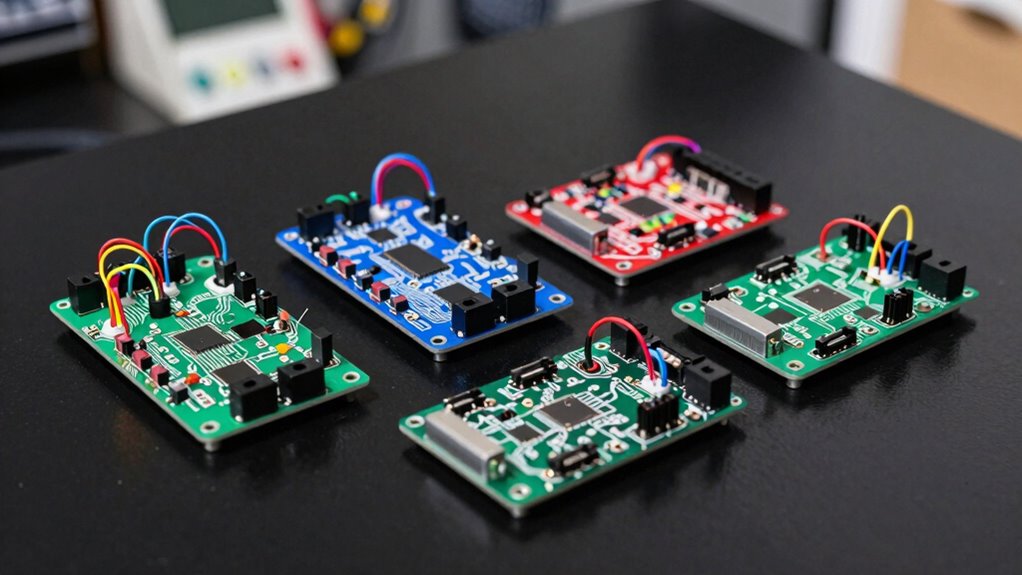

Choosing the right arcade encoder board kit depends on your specific project needs, whether you’re building a two-player setup, customizing buttons, or aiming for zero delay responses. For beginners, simplicity and compatibility matter most, while advanced users may prioritize customization and technical flexibility. Among the top picks, Guwarry 2-Player Zero Delay USB Encoder stands out for its seamless responsiveness, ideal for fast-paced arcade gaming. Meanwhile, SJ@JX 2 Player Arcade USB Encoder Kit offers extensive button options and customization, better suited for those wanting a more tailored arcade experience. The main tradeoffs revolve around ease of setup versus customization potential, so I’ll guide you through which option aligns best with your project goals.

Play games on Amazon Luna for your game nights, included with Prime
- A rotating selection of games, no download needed
- Play on TV, laptop or phone
- Fast, free delivery for your gear, too
Complete the kit


Key Takeaways
- Zero delay response is critical for authentic arcade gameplay, making some models more suitable for competitive or fast-paced gaming.
- Compatibility with platforms like Raspberry Pi and PC varies; ensure your platform is supported before purchasing.
- DIY assembly requirements differ, with some kits including all necessary components and others necessitating additional parts.
- More buttons and flexible configurations typically come with increased complexity in setup and wiring.
- Budget-friendly options may lack advanced features or customization, so weigh cost against your desired control.
| Guwarry 2-Player Zero Delay USB Encoder for Arcade Games |  | Best Overall for Zero Delay Performance | Number of Players: 2 | Power Output: 3 x 5V | Connector Type: JST XH2.54 | VIEW ON AMAZON | See Our Full Breakdown |
| Zero Delay Arcade Game USB Encoder for PC, MAME & Raspberry Pi Projects |  | Best for Versatile Platform Compatibility | Compatible Devices: PC, Windows | Controller Type: Joystick | Connectivity Technology: USB | VIEW ON AMAZON | See Our Full Breakdown |
| SJ@JX 2 Player Arcade USB Encoder Board Zero Delay Game Controller DIY Kit with 20 Buttons and 2 Joysticks for RetroPie, PC, MAME, Raspberry Pi |  | Best for Customization and Full Control | Encoder Size: 8.5cm x 3.5cm x 1cm | USB Cable Length: 180cm | Button & Joystick Cable Length: 35cm | VIEW ON AMAZON | See Our Full Breakdown |
| Reyann Zero Delay Arcade USB Encoder for PC and Raspberry Pi |  | Best for DIY Arcade Machine Building | Compatibility: PC, Raspberry Pi 1/2/3 | Support: All joystick and push button types with 4.8mm terminals | Delay: Zero delay | VIEW ON AMAZON | See Our Full Breakdown |
| EG STARTS Zero Delay USB Encoder for PC LED Joystick Set – DIY Arcade Controller Kit |  | Best for Compatibility and Ease of Use | Compatibility: Windows XP, Windows 7, Windows 8 | Interface: 5Pin joystick, 3Pin 2.8mm LED push buttons | Features: Zero delay, supports custom settings, plug and play | VIEW ON AMAZON | See Our Full Breakdown |
| arcade encoder board kit | Compatibility |
|---|---|
| Guwarry 2-Player Zero Delay US | PC, Raspberry Pi, Windows, Mac, Arcade1Up |
| Zero Delay Arcade Game USB Enc | — |
| SJ@JX 2 Player Arcade USB Enco | — |
| Reyann Zero Delay Arcade USB E | PC, Raspberry Pi 1/2/3 |
| EG STARTS Zero Delay USB Encod | Windows XP, Windows 7, Windows 8 |
More Details on Our Top Picks
Guwarry 2-Player Zero Delay USB Encoder for Arcade Games
This encoder is designed specifically for fast-paced, multiplayer arcade setups, supporting 2 players with zero delay response. Its compatibility spans PC, Raspberry Pi, and Arcade1Up, making it a versatile choice for DIY projects. The inclusion of three 5V power outputs for LED lighting simplifies wiring, and the quick JST XH2.54 connectors make installation straightforward. Compared to other options, it excels in response time but is limited to 2-player configurations, which may restrict larger setups. It’s ideal for users prioritizing responsiveness but who are comfortable with basic wiring.
Pros:- Zero delay response for authentic arcade gameplay
- Supports multiple platforms including Raspberry Pi and PC
- Easy quick connection with JST XH2.54 plugs
- Includes multiple 5V power outputs for LEDs
Cons:- Limited to 2-player setups
- Requires some technical knowledge for installation
Best for: Arcade enthusiasts needing fast response for multiplayer games
Not ideal for: Users requiring more than 2-player support or advanced customization
- Number of Players:2
- Power Output:3 x 5V
- Connector Type:JST XH2.54
- Compatibility:PC, Raspberry Pi, Windows, Mac, Arcade1Up
- Application:DIY arcade projects
Our verdict“A top choice for multiplayer arcade setups where response time is essential.”
Zero Delay Arcade Game USB Encoder for PC, MAME & Raspberry Pi Projects
This compact, lightweight encoder offers 16 ergonomic buttons and is perfect for MAME and Retropie projects. It connects via USB and supports both PC and Raspberry Pi, making it a flexible choice for hobbyists interested in retro gaming or custom arcade builds. Its straightforward design favors ease of use, but the simplicity means it lacks advanced customization features. The absence of wireless options and basic design may be limiting for users wanting a more elaborate setup, but it delivers reliable performance at a budget-friendly price.
Pros:- Compatible with multiple platforms including PC and Raspberry Pi
- Features 16 ergonomic buttons for versatile gameplay
- Compact and lightweight for easy setup
- Simple plug-and-play USB connection
Cons:- Limited to USB connection only
- No wireless option available
- Basic design with fewer customization options
Best for: Users seeking a versatile, straightforward arcade encoder
Not ideal for: People wanting wireless connectivity or extensive button customization
- Compatible Devices:PC, Windows
- Controller Type:Joystick
- Connectivity Technology:USB
- Additional Features:Ergonomic
- Button Quantity:16
- Hardware Platform:PC
- Item Weight:126 g
- Dimensions:5.12 x 3.15 x 1.77 inches
Our verdict“A reliable choice for hobbyists looking for straightforward, multi-platform support without complex features.”
This kit offers a comprehensive, customizable arcade control experience with 20 buttons and 2 joysticks, supporting zero delay response across multiple platforms including Raspberry Pi and PC. Its all-in-one design includes cables and components, making installation easier for those with some technical skills. The vibrant plug design adds visual appeal, but setup can be complex, and lack of detailed instructions might challenge beginners. It’s perfect for users who want a highly tailored arcade experience and are comfortable with wiring and configuration.
Pros:- Zero delay response for authentic arcade feel
- Includes all necessary cables and components
- Supports multiple platforms including Raspberry Pi and PC
- Highly customizable with 20 buttons and 2 joysticks
Cons:- Requires some technical knowledge for setup
- Limited to 2-player configurations
- No detailed instructions included
Best for: Experienced builders seeking extensive customization
Not ideal for: Beginners or those seeking plug-and-play simplicity
- Encoder Size:8.5cm x 3.5cm x 1cm
- USB Cable Length:180cm
- Button & Joystick Cable Length:35cm
- Button Terminal:2.8mm, 5pin
- Joystick Terminal:4.8mm
Our verdict“Ideal for hobbyists wanting a fully customizable arcade control system and willing to handle wiring complexity.”
Reyann Zero Delay Arcade USB Encoder for PC and Raspberry Pi
This encoder is designed for builders aiming to create their own arcade machine, supporting all joystick and push button types with 4.8mm terminals. Its zero delay feature ensures responsive gameplay, making it suitable for high-quality DIY projects. Compatibility with PC and Raspberry Pi enables broad use, but it requires DIY assembly and some technical skill. It’s best suited for those ready to handle wiring and configuration without included buttons or joystick, focusing on the core encoder functionality.
Pros:- Supports all joystick and button types with 4.8mm terminals
- Zero delay for responsive gameplay
- Compatible with PC and Raspberry Pi
- Flexible for custom arcade builds
Cons:- Requires DIY assembly and technical knowledge
- Limited to arcade-style controllers
- No included buttons or joystick
Best for: DIY enthusiasts building custom arcade machines
Not ideal for: Beginners looking for ready-to-go kits or plug-and-play setups
- Compatibility:PC, Raspberry Pi 1/2/3
- Support:All joystick and push button types with 4.8mm terminals
- Delay:Zero delay
- Use:DIY arcade game machine
Our verdict“Perfect for DIY builders who want to design their own arcade control panel from scratch.”
EG STARTS Zero Delay USB Encoder for PC LED Joystick Set – DIY Arcade Controller Kit
This encoder is tailored for DIY arcade controllers supporting Windows XP, 7, and 8, with compatibility for 5-pin joysticks and 3-pin LED push buttons. Its zero delay feature guarantees smooth gameplay, and the plug-and-play design simplifies setup for users familiar with these Windows versions. However, it may not support newer Windows OS and lacks included cables or detailed instructions, which could complicate assembly for some users. It’s best suited for those who value straightforward operation within supported Windows environments.
Pros:- Zero delay response for smooth gameplay
- Supports multiple interface types for customization
- Plug and play setup without drivers
Cons:- Limited to Windows XP, 7, and 8
- Requires DIY assembly and configuration
- No included cables or accessories
Best for: Users with existing Windows XP, 7, or 8 systems wanting easy setup
Not ideal for: People on newer Windows versions or seeking extensive customization
- Compatibility:Windows XP, Windows 7, Windows 8
- Interface:5Pin joystick, 3Pin 2.8mm LED push buttons
- Features:Zero delay, supports custom settings, plug and play
Our verdict“A practical choice for users with older Windows systems who want reliable, plug-and-play arcade control encoding.”

How We Picked
Our selection process centered on assessing build quality, responsiveness, platform compatibility, customization options, and ease of installation. We reviewed detailed specifications, pros and cons, and considered the typical user profiles—from beginners to seasoned arcade enthusiasts. Priority was given to zero delay response, a key feature for authentic arcade experience, as well as the versatility of platforms supported. We aimed to balance value with performance, ensuring each pick offers something distinct for different types of arcade builders and hobbyists.
| arcade encoder board kit | Compatibility |
|---|---|
| Guwarry 2-Player Zero Delay US | PC, Raspberry Pi, Windows, Mac, Arcade1Up |
| Zero Delay Arcade Game USB Enc | — |
| SJ@JX 2 Player Arcade USB Enco | — |
| Reyann Zero Delay Arcade USB E | PC, Raspberry Pi 1/2/3 |
| EG STARTS Zero Delay USB Encod | Windows XP, Windows 7, Windows 8 |
Factors to Consider When Choosing Arcade Encoder Board Kit
When selecting an arcade encoder board kit, it’s important to consider your project scope, technical skills, and desired features. Whether you want a simple plug-and-play solution or a highly customizable setup, the right choice depends on balancing ease of installation against control and responsiveness. Think about platform compatibility, number of buttons, and whether you prefer wired or wireless connections. Understanding these factors will help you identify which encoder matches your arcade build ambitions.
Platform Compatibility
Confirm whether the encoder works with your intended platform, such as PC, Raspberry Pi, or specific arcade cabinets. Some encoders are designed for retro gaming platforms like MAME or Retropie, while others focus on PC compatibility. Ensuring your platform is supported avoids costly mistakes and simplifies setup.
Response Time and Delay
For an authentic arcade experience, zero delay response is essential, especially for fast-paced or competitive games. Some encoders advertise zero delay, while others may introduce lag that affects gameplay. Decide if responsiveness outweighs customization or ease of use for your project.
Ease of Installation
Assess whether you prefer a ready-to-use, plug-and-play device or are comfortable with DIY wiring and assembly. Kits with included components and clear instructions tend to be more user-friendly, especially for beginners, while advanced users may prioritize flexibility and customization, accepting the added complexity.
Number of Buttons and Customization
Determine how many buttons and joysticks your arcade cabinet requires. More buttons offer greater control but typically involve more complex wiring. Some kits support extensive customization and multiple button types, making them suitable for detailed control panels.
Frequently Asked Questions
What is a zero delay arcade encoder?
A zero delay arcade encoder ensures that button presses and joystick movements are registered immediately without lag. This feature is especially valuable for fast-paced games, allowing for authentic arcade gameplay where timing is critical. Many high-end DIY kits include zero delay functionality to mimic real arcade responses.
Can I use these encoders with a Raspberry Pi?
Yes, several of these encoders, including the Guwarry and SJ@JX models, support Raspberry Pi, making them suitable for retro gaming projects like MAME or Retropie. Always double-check the specifications to confirm compatibility with your specific Pi version and software requirements.
Are these kits easy to install for beginners?
Ease of installation varies. Some kits come with all components and straightforward connections, while others require soldering, wiring, and technical knowledge. Beginners should look for kits with detailed instructions and pre-wired components, whereas experienced hobbyists might prefer more flexible, customizable options.
Do these encoders support wireless connections?
Most arcade encoders in this lineup are wired via USB or other direct connections. Wireless options are rare and typically more complex to set up. If wireless connectivity is a priority, you’ll need to explore specialized controllers or adapters designed for wireless use.
What should I consider when choosing an arcade encoder kit?
Key considerations include platform compatibility, response delay, number of buttons and joysticks, ease of installation, and customization options. Decide whether you prefer a plug-and-play device or a DIY setup, and match your choice to your technical skills and project goals to ensure a satisfying build experience.
Conclusion
If you’re new to arcade building or want a simple, reliable setup, the Guwarry 2-Player Zero Delay USB Encoder offers excellent response and straightforward compatibility. For hobbyists seeking extensive customization, the SJ@JX 2 Player Arcade USB Encoder Kit provides a wealth of buttons and full control over your arcade experience. DIY enthusiasts who want to craft their own control panel from scratch should consider the Reyann Zero Delay Encoder for maximum flexibility. Meanwhile, those working within older Windows environments on a budget may find the EG STARTS Zero Delay Encoder to be a practical, no-fuss choice. Match your project ambitions and technical comfort level to these options to find your ideal arcade encoder kit in 2026.
Halloween Picks
halloween
As an affiliate, we earn on qualifying purchases.