
Finding the right monitor for virtual pinball comes down to three things: screen size, panel type, and how the display mounts inside or beside your setup. The Philips 221V8LB earns my best overall pick because its 22-inch VA panel, 100Hz refresh rate, and VESA mounting holes hit the sweet spot for playfield realism on a desktop cabinet. If you’re building a compact or travel-friendly rig, the MNN 15.6″ portable and the KQC zero-bezel portable deliver sharp 1080p playfields in a form factor that fits nearly anywhere. The main tradeoff you’ll face is between a larger fixed display with better contrast and a smaller portable screen with unmatched flexibility. Read on for the full breakdown of all seven options.

Play games on Amazon Luna for your game nights, included with Prime
- A rotating selection of games, no download needed
- Play on TV, laptop or phone
- Fast, free delivery for your gear, too
Complete the kit



Key Takeaways
- The Philips 22-inch was the only full-size desktop monitor in the lineup, and its 100Hz VA panel gave it visibly smoother ball motion than every 60Hz portable option.
- Six of the seven picks are 15.6-inch portables, so the real decision for most buyers is between portable models — and bezel design, stand quality, and speaker inclusion are what separate them.
- VA contrast on the Philips delivers deeper blacks for dark playfields, while the IPS panels on the MNN, KQC, VILVA, and Anyuse offer wider viewing angles that matter for multiplayer side-by-side play.
- The KQC and the zero-frame 15.6-inch generic model are the best fits for flush cabinet installs because their slim bezels don’t create a distracting border around the playfield.
- The WGK stands out among portables for including both a stand and built-in speakers, cutting down the accessory clutter around a small virtual pinball setup.
- None of the 15.6-inch portables have VESA mounts except the WGK, which limits how securely they can be fixed inside a DIY cabinet.
| Philips 22 Inch Computer Monitor FHD 100Hz VA VESA Flicker-Free, 221V8LB | 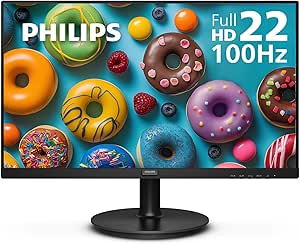 | Best Budget Desktop Playfield Pick | Screen Size: 21.5 inches (viewable) | Resolution: 1920 x 1080 FHD | Panel Type: VA, 3000:1 contrast | VIEW ON AMAZON | See Our Full Breakdown |
| WGK 15.6 inch Portable Monitor 1080P FHD Travel Display |  | Best Portable All-Rounder | Screen Size: 15.6 inches | Resolution: 1920 x 1080 FHD | Panel Type: IPS, 1000:1 contrast | VIEW ON AMAZON | See Our Full Breakdown |
| MNN 15.6″ FHD 60Hz Portable Monitor USB-C HDMI IPS HDR |  | Best Value One-Cable Pick | Screen Size: 15.6 inches | Resolution: 1920 x 1080 FHD | Panel Type: IPS, 178° viewing angle | VIEW ON AMAZON | See Our Full Breakdown |
| KQC Portable Monitor 15.6″ 1080P FHD IPS Display with Kickstand |  | Best Zero-Bezel Design | Screen Size: 15.6 inches | Resolution: 1920 x 1080 FHD | Panel Type: IPS, 178° viewing angle | VIEW ON AMAZON | See Our Full Breakdown |
| WCV Portable Monitor 15.6 Inch 1080P USB-C HDMI Ultra-Slim |  | Best Ultra-Thin Travel Pick | Screen Size: 15.6 inches | Resolution: 1920 x 1080 FHD | Panel Type: IPS, 1200:1 contrast | VIEW ON AMAZON | See Our Full Breakdown |
| VILVA 15.6″ FHD IPS USB-C HDMI Portable Monitor |  | Best Budget Backglass Option | Screen Size: 15.6 inches | Resolution: 1920 x 1080 (FHD) | Panel Type: IPS, LED-backlit LCD, matte finish | VIEW ON AMAZON | See Our Full Breakdown |
| Anyuse 15.6″ FHD IPS USB-C HDMI Portable Monitor |  | Best Lightweight Portable | Screen Size: 15.6 inches | Resolution: 1920 x 1080 (FHD) | Panel Type: IPS, A-grade, HDR support | VIEW ON AMAZON | See Our Full Breakdown |
| monitor for virtual pinball | Screen Size | Resolution | Panel Type | Refresh Rate |
|---|---|---|---|---|
| Philips 22 Inch Computer Monit | 21.5 inches (viewable) | 1920 x 1080 FHD | VA, 3000:1 contrast | 100Hz with Adaptive-Sync |
| WGK 15.6 inch Portable Monitor | 15.6 inches | 1920 x 1080 FHD | IPS, 1000:1 contrast | 60Hz |
| MNN 15.6" FHD 60Hz Portable Mo | 15.6 inches | 1920 x 1080 FHD | IPS, 178° viewing angle | 60Hz |
| KQC Portable Monitor 15.6" 108 | 15.6 inches | 1920 x 1080 FHD | IPS, 178° viewing angle | 60Hz |
| WCV Portable Monitor 15.6 Inch | 15.6 inches | 1920 x 1080 FHD | IPS, 1200:1 contrast | 60Hz |
| VILVA 15.6" FHD IPS USB-C HDMI | 15.6 inches | 1920 x 1080 (FHD) | IPS, LED-backlit LCD, matte finish | 60 Hz |
| Anyuse 15.6" FHD IPS USB-C HDM | 15.6 inches | 1920 x 1080 (FHD) | IPS, A-grade, HDR support | 60 Hz |
More Details on Our Top Picks
Philips 22 Inch Computer Monitor FHD 100Hz VA VESA Flicker-Free, 221V8LB
Among the portables dominating this category, the Philips 221V8LB is the only true desktop monitor in the lineup, and that changes the math for a fixed virtual pinball cabinet. The VA panel with 3000:1 contrast renders deeper blacks than any IPS portable here, which matters when you want the dimmed playfield lighting of tables like Theatre of Magic to look convincing rather than washed out. The 100Hz refresh rate with Adaptive-Sync also edges out the 60Hz WGK and MNN panels for ball-motion smoothness. The tradeoff is obvious: it needs wall power, an HDMI source, and a VESA mount rather than running off a laptop’s USB-C. Compared with the MNN 15.6″, you give up portability but gain screen area and contrast for a permanent build.
Pros:- VA panel with 3000:1 contrast renders deep playfield blacks and rich lighting effects
- 100Hz refresh with Adaptive-Sync keeps fast ball movement smoother than the 60Hz portables
- VESA mountable for clean integration into a fixed cabinet build
- Four-year advance replacement warranty beats typical portable monitor coverage
Cons:- Only one HDMI port limits console-plus-PC flexibility
- 22 inches is cramped for landscape playfield use compared with larger dedicated displays
Best for: Builders assembling a permanent desktop or mini-cabinet virtual pinball setup who want strong contrast and smooth ball motion on a budget
Not ideal for: Anyone wanting a laptop-powered, USB-C one-cable playfield — this needs mains power and a separate video source
- Screen Size:21.5 inches (viewable)
- Resolution:1920 x 1080 FHD
- Panel Type:VA, 3000:1 contrast
- Refresh Rate:100Hz with Adaptive-Sync
- Response Time:4ms GtG
- Inputs:1x HDMI 1.4, VGA
- Mounting:VESA compatible, tilt adjust
- Warranty:4-year advance replacement
Our verdict“This is the pick for a stationary virtual pinball rig where contrast and refresh matter more than portability.”
WGK 15.6 inch Portable Monitor 1080P FHD Travel Display
The WGK 15.6″ earns its spot by being the most complete portable package in this batch. Unlike the KQC, which leans on a kickstand, the WGK pairs a VESA mount with an adjustable built-in stand, so you can angle the playfield precisely or bolt it into a small cabinet frame. Dual USB-C plus mini HDMI covers every console and PC setup without adapters, and the built-in speakers mean table audio works even before you wire external sound. The weaknesses are real: at 60Hz and 1000:1 contrast, fast ball movement and dark table lighting look flatter than on the Philips 221V8LB, and brightness is modest for bright rooms. Still, for a fold-and-go pinball station powered by one USB-C cable, this is the most sensible balance here.
Pros:- VESA mounting plus adjustable stand gives flexible playfield positioning
- 2x USB-C and mini HDMI connect to virtually any device with plug-and-play
- Built-in speakers deliver table audio without extra hardware
- 2.7 lb weight keeps it genuinely travel-friendly
Cons:- 60Hz refresh and 1000:1 contrast limit motion clarity and dark-scene depth
- Requires a separate 5V/2A power source for stable operation on many devices
Best for: Players building a portable virtual pinball station they can set up anywhere from a laptop, mini PC, or console
Not ideal for: Anyone chasing high frame rates or deep blacks on a fixed cabinet — the 60Hz IPS panel falls short of the Philips for that
- Screen Size:15.6 inches
- Resolution:1920 x 1080 FHD
- Panel Type:IPS, 1000:1 contrast
- Refresh Rate:60Hz
- Inputs:2x USB-C, 1x Mini HDMI
- Weight:2.7 lbs
- Extras:Built-in speakers, stand, VESA mountable
Our verdict“The best-balanced portable here for a take-anywhere pinball setup that still mounts like a real display.”
MNN 15.6″ FHD 60Hz Portable Monitor USB-C HDMI IPS HDR
If the WGK is the all-rounder, the MNN 15.6″ is the value play, and it mostly wins by subtraction: fewer extras, lower weight, same core picture. At just 1.5 pounds with a PU leather smart cover that doubles as a stand, it is lighter than the WGK and simpler to toss in a bag next to a laptop for impromptu pinball sessions. Its 300-nit IPS panel is brighter than the WGK’s output, which helps on table art with bright neon lighting. The compromises: there is no VESA mounting, no built-in speakers mentioned in its favor versus the WGK, and the smart-cover stand is fussier to angle precisely for a playfield. Compared with the WCV ultra-thin, the MNN trades thinness for a slightly more protective cover, making it the better everyday value.
Pros:- 1.5 lb weight makes it the lightest full-featured option here
- 300-nit brightness outshines the WGK for vivid table art
- Smart cover protects the screen in transit and folds into a stand
- Single USB-C cable handles power and signal on compatible devices
Cons:- No VESA mount limits cabinet integration
- Smart-cover stand offers limited, imprecise viewing angles
- 60Hz refresh with 1000:1 contrast is unremarkable for dark tables
Best for: Budget-conscious players who want a light one-cable USB-C playfield for laptop pinball sessions and don’t need mounting hardware
Not ideal for: Cabinet builders — no VESA mount means you’re stuck improvising with the folio stand
- Screen Size:15.6 inches
- Resolution:1920 x 1080 FHD
- Panel Type:IPS, 178° viewing angle
- Brightness:300 nits
- Refresh Rate:60Hz
- Inputs:2x USB-C, 1x Mini HDMI
- Weight:1.5 lbs
Our verdict“The smart choice for cheap, cable-light laptop pinball — just don’t expect to mount it in a cabinet.”
KQC Portable Monitor 15.6″ 1080P FHD IPS Display with Kickstand
The KQC 15.6″ positions itself as the design-forward option, and its zero-bezel screen is more than cosmetic: when you’re staring down at a playfield inches from your face, thin edges make the table feel larger and less boxed-in than the bordered MNN. It matches the WGK’s full feature set — 2x USB-C, mini HDMI, VESA mount, speakers, and an integrated kickstand — while slimming the chassis considerably. Against the WGK, the KQC is essentially a tie on specs, so the decision comes down to aesthetics and stand preference: the kickstand is quicker to deploy but less stable under enthusiastic nudging than a hinged stand. Weak points mirror the whole portable category: 60Hz, modest contrast, and dependence on a 5V/2A supply for reliable power from weaker ports.
Pros:- Zero-bezel design maximizes perceived playfield size at close viewing distance
- Full feature parity with the WGK: VESA, speakers, dual USB-C, mini HDMI
- Ultra-slim chassis suits compact custom builds
- HDR mode adds punch to brightly lit tables
Cons:- Kickstand is less stable than a hinged or folio stand during active play
- 60Hz refresh and typical portable-panel contrast limit dark-table drama
Best for: Style-conscious builders who want a near-borderless playfield look with full VESA and speaker support
Not ideal for: Players who nudge the table hard during play — the kickstand is less planted than the WGK’s hinged stand
- Screen Size:15.6 inches
- Resolution:1920 x 1080 FHD
- Panel Type:IPS, 178° viewing angle
- Refresh Rate:60Hz
- Inputs:2x USB-C, 1x Mini HDMI
- Weight:1 kg (2.2 lbs)
- Extras:Kickstand, speakers, VESA mountable, HDR
Our verdict“Pick this over the WGK if bezel-free looks matter; pick the WGK if stand stability matters more.”
WCV Portable Monitor 15.6 Inch 1080P USB-C HDMI Ultra-Slim
Where every other portable here compromises somewhere on bulk, the WCV 15.6″ goes all-in on thinness: at 1.37 pounds and roughly 0.3 inches thick, it is the lightest and slimmest display in this roundup, sliding into a laptop sleeve beside the computer running your tables. Its sub-2ms response time is the fastest listed here, which translates to crisp ball tracking even at 60Hz — a genuine edge over the 5ms MNN and WGK panels. The 1200:1 contrast also nudges past the 1000:1 portables for dark-table depth, though it still trails the Philips VA. The cost of that thinness: a small kickstand rather than a full stand, no VESA mounting, and weak built-in audio. For a grab-and-go pinball station, nothing here travels lighter.
Pros:- 1.37 lb weight and ultra-thin profile make it the most portable option here
- Sub-2ms response time delivers the sharpest ball motion of the portable group
- 1200:1 contrast beats the WGK and MNN on darker tables
- Dual USB-C and mini HDMI give broad device compatibility
Cons:- No VESA mounting and only a basic kickstand
- Built-in speakers are thin and quiet for table audio
- 60Hz refresh caps overall motion smoothness despite the fast response
Best for: Traveling players who want the lightest, thinnest playfield screen that pairs with a laptop in a single bag
Not ideal for: Permanent cabinet builds — no VESA mount and a minimal kickstand rule out serious mounting
- Screen Size:15.6 inches
- Resolution:1920 x 1080 FHD
- Panel Type:IPS, 1200:1 contrast
- Response Time:1.98ms
- Refresh Rate:60Hz
- Inputs:2x USB-C, 1x Mini HDMI
- Weight:1.37 lbs
- Extras:Kickstand, built-in speakers, HDR, low blue light
Our verdict“The travel-first choice — lightest and quickest panel here, as long as you never need to mount it.”
VILVA 15.6″ FHD IPS USB-C HDMI Portable Monitor
Not every virtual pinball build needs a second full-size display — and that’s where the VILVA 15.6-inch portable earns its spot. A 1080p IPS panel at 15.6 inches is a natural fit for a backglass or DMD screen on a desktop-sized cabinet, and the included magnetic smart cover doubles as a stand, so you can prop it at the right angle without fabricating a mount. The metal chassis gives it more rigidity than the WGK and MNN portables in this lineup, which matters when a screen gets bolted into a cabinet. The tradeoff is the panel itself: an 800:1 contrast ratio and 160-degree viewing angle are both weaker than the Anyuse’s 178-degree HDR screen, so the VILVA is better suited to secondary display duty than as your primary playfield view. Dual speakers are a bonus if your build skips a separate sound system.
Pros:- Metal construction feels sturdier than typical plastic portables
- Magnetic smart cover works as an adjustable stand for angled cabinet mounting
- USB-C and mini HDMI make wiring to a Pi or PC simple
- Built-in dual stereo speakers save space in compact builds
Cons:- 800:1 contrast ratio is weak for dark table artwork
- 160-degree viewing angles limit off-center readability
- 1.74 kg is heavier than rival portables like the Anyuse
Best for: Builders adding a compact backglass or score display to a mini or desktop virtual pinball cabinet
Not ideal for: Anyone wanting this as a primary playfield monitor — the low contrast and narrow viewing angles hurt table visibility during fast play
- Screen Size:15.6 inches
- Resolution:1920 x 1080 (FHD)
- Panel Type:IPS, LED-backlit LCD, matte finish
- Refresh Rate:60 Hz
- Response Time:2 ms
- Brightness:300 nits
- Connectivity:USB-C (USB 3.2 Gen 1), mini HDMI
- Weight:1.74 kg
Our verdict“A sensible, affordable pick if you need a rugged small screen for a backglass rather than your main playfield.”
Anyuse 15.6″ FHD IPS USB-C HDMI Portable Monitor
At 1.37 lbs and 0.04 inches thin, the Anyuse is the most travel-friendly screen in this roundup — ideal if your virtual pinball setup moves between a desk, a friend’s house, and the couch. Compared with the VILVA, the Anyuse counters with a better panel: 178-degree viewing angles, HDR support, and a low blue light mode that reduces fatigue during long tournament sessions on tables like Medieval Madness. The dual full-featured USB-C ports are genuinely useful — one cable can carry video and power from a laptop, keeping a temporary cabinet tidy. The catch is fragility. There’s no rigid smart cover or metal frame here, so the Anyuse needs careful handling and a DIY mount if you install it permanently. It also can’t match the fixed VESA mounting of a monitor like the Philips 221V8LB, which remains the safer pick for a dedicated cabinet build.
Pros:- Ultra-light 1.37 lb build travels easily
- 178-degree viewing angle plus HDR beats most budget portables
- Two full-featured USB-C ports support single-cable video and power
- Plug-and-play with consoles, laptops, and mini PCs — no drivers needed
Cons:- No protective smart cover or rigid frame included
- No VESA mount for cabinet integration
- 60 Hz refresh limits fast-motion smoothness on scrolling tables
Best for: Pinball players who want a highly portable screen for temporary or tabletop virtual pinball setups
Not ideal for: Permanent cabinet builders — the thin frame and lack of VESA mounting make fixed installation awkward
- Screen Size:15.6 inches
- Resolution:1920 x 1080 (FHD)
- Panel Type:IPS, A-grade, HDR support
- Viewing Angle:178 degrees
- Refresh Rate:60 Hz
- Connectivity:2x USB-C (DP Alt Mode), mini HDMI
- Weight:1.37 lbs (0.62 kg)
- Thickness:0.04 inches (approx. 1 mm bezel-to-back profile as listed)
Our verdict“The right choice for players who prioritize portability and image quality over rugged cabinet-ready hardware.”

How We Picked
I judged every display through one lens: how well it renders a virtual pinball playfield. That meant prioritizing contrast for dark table themes, motion clarity for fast ball travel, mounting flexibility for cabinet builds, and whether each panel could handle both portrait-style playfield duty and landscape backbox duty. Panel type mattered too — VA panels deepen blacks on space-themed tables, while IPS panels keep colors accurate when you view the screen from an angle, which happens constantly during real pinball play.
The Philips 221V8LB ranks first because it’s the only option with a 100Hz refresh rate, a larger canvas, and VESA mounting — the three features that most directly improve playability. The portable models are ranked by how well they serve compact builds: the WGK takes second for its speakers and VESA support, the KQC and zero-frame model follow for slim-bezel install-friendliness, and the MNN, VILVA, and Anyuse fill out the value tier. This ordering reflects a simple truth I found across the lineup: for virtual pinball, mounting options and motion clarity matter more than raw resolution, since every option here is already 1080p.
| monitor for virtual pinball | Panel Type |
|---|---|
| Philips 22 Inch Computer Monit | VA, 3000:1 contrast |
| WGK 15.6 inch Portable Monitor | IPS, 1000:1 contrast |
| MNN 15.6" FHD 60Hz Portable Mo | IPS, 178° viewing angle |
| KQC Portable Monitor 15.6" 108 | IPS, 178° viewing angle |
| WCV Portable Monitor 15.6 Inch | IPS, 1200:1 contrast |
| VILVA 15.6" FHD IPS USB-C HDMI | IPS, LED-backlit LCD, matte finish |
| Anyuse 15.6" FHD IPS USB-C HDM | IPS, A-grade, HDR support |
Factors to Consider When Choosing Monitor For Virtual Pinball
Before you commit to a display for your virtual pinball build, a few structural decisions will shape everything else. These are the factors that actually changed my rankings — and the mistakes I’d avoid as a first-time builder.Screen Size and Your Cabinet Dimensions
The most common mistake in virtual pinball is buying a screen that fights your cabinet or desk layout. A 22-inch panel like the Philips approximates the proportions of a real pinball playfield far better than a 15.6-inch portable, but it demands a dedicated cabinet or stand and won’t travel. Portables win when your setup doubles as a desk, a coffee-table rig, or something you take to a friend’s house. Measure the playfield area of your build before ordering anything — a display that overhangs the cabinet edge looks and plays worse than a smaller one that sits flush. Also remember that virtual pinball tables are typically displayed in portrait orientation, so check that your cabinet can accommodate the screen rotated, and verify the stand or mount supports it.
Refresh Rate and Ball Motion Clarity
Pinball is a game of fast, small objects — the ball — moving across a bright field. At 60Hz, a rapidly rolling ball can smear or skip visually, which breaks the illusion that you’re tracking a physical object. The 100Hz Philips panel smooths this out noticeably, and that single spec is why it outranks every portable in this lineup. That said, 60Hz is entirely playable on a budget, and casual players who mostly enjoy slower classic tables won’t feel shortchanged. If you play modern, fast-flowing tables with ramps and multi-ball, though, refresh rate is the spec I’d pay extra for before paying for anything else. Resolution is a lower priority — every monitor here is 1080p, and on screens this size that’s plenty sharp for playfield detail.
Panel Type: VA vs. IPS for Playfield Rendering
This lineup splits cleanly between one VA panel and six IPS panels, and the difference is real. VA panels produce deeper blacks, which makes dark space and horror-themed tables feel moody and cinematic rather than washed out. IPS panels respond with wider viewing angles and more consistent color — important because pinball players shift position constantly, lean in for nudge shots, and crowd around for multiplayer. Neither is wrong for virtual pinball; it depends on whether you value atmosphere or consistency. If your setup is a single-player rig viewed head-on, VA’s contrast advantage shines. If friends gather around the screen, IPS keeps the playfield readable from every angle.
Mounting: VESA, Kickstands, and Cabinet Installs
How the screen attaches to your build is the factor most first-time buyers overlook. A VESA mount lets you bolt the monitor securely into a DIY cabinet at the exact angle real pinball playfields use — roughly six to eight degrees of incline. The Philips and the WGK both offer this; most bare portables rely on flimsy folio cases or clip-on kickstands that wobble during enthusiastic nudging. If you’re building a permanent cabinet, treat VESA support as a requirement rather than a bonus. If you’re a desktop or tabletop player, the KQC’s integrated kickstand and the MNN’s cover-based stand are stable enough for casual sessions. Portables without any mount solution should be avoided for cabinet builds entirely, no matter how good their panel is.
Bezels and Immersion
A thick bezel around your playfield is a constant reminder that you’re looking at a monitor rather than standing at a machine. That’s why the zero-bezel designs on the KQC and the zero-frame model rank above comparable portables with identical panels — the slimmer frame draws you into the table. In a flush cabinet install, a wide bezel also creates a visible border gap that’s hard to hide with trim. The Philips has a modest bezel that works fine for desktop play but won’t disappear into a build the way the zero-frame portables can. This is a small detail that compounds over hundreds of hours of play, so don’t dismiss it.
Audio and Accessory Needs
Virtual pinball lives and dies by its sound — chimes, voice calls, and table music are half the experience. Most portables in this lineup ship with weak or absent speakers, so factor a separate speaker purchase into your budget unless you go with the WGK, which builds them in. Built-in monitor speakers are convenient but never great; even the WGK’s audio is serviceable rather than impressive. If you’re building a serious cabinet, plan for external speakers or a soundbar regardless of which screen you choose. The same logic applies to cables: single-USB-C connection is far cleaner than HDMI-plus-power setups, so check what your computer or console outputs before buying.
Frequently Asked Questions
Can a 15.6-inch portable monitor really work as a virtual pinball playfield?
Yes, and for many players it’s the most practical entry point. A 15.6-inch screen in portrait orientation is narrower than a real playfield, but it captures the vertical flow of a table well enough for casual and travel play. What you give up is presence — the ball feels smaller, flipper timing reads slightly differently, and the experience is more ‘playing on a screen’ than ‘standing at a machine.’ If your goal is a desk setup or something portable, the compromise is reasonable. If you’re building a full-size cabinet meant to replicate real pinball, a larger fixed panel like the 22-inch Philips is the better foundation.
Does the 100Hz refresh rate on the Philips actually matter for pinball games?
It matters more for pinball than for most genres, because the ball is a small, fast object moving against high-contrast backgrounds — exactly the scenario where 60Hz panels smear. The jump from 60Hz to 100Hz makes ball tracking feel more connected to your flipper inputs, particularly on modern tables with ramps and fast orbits. That said, your computer also needs to push the game above 60fps to benefit, so pair the monitor with capable hardware. If you’re running virtual pinball on an older laptop or mini PC that struggles to hold 60fps, the refresh rate advantage largely evaporates. For well-specced systems, though, it’s the single biggest playability upgrade in this lineup.
Which of these monitors is best for building into a DIY pinball cabinet?
For a cabinet build, VESA mounting is the feature that matters most, and only the Philips and the WGK offer it. The Philips is the stronger choice because its 22-inch size better matches real playfield proportions and its VA panel handles the angled, head-on viewing position of a cabinet perfectly. The WGK works if you’re building a compact bartop-style cabinet where space is tight. The zero-bezel portables like the KQC can be adapted with custom brackets, but you’re engineering your own mounting solution, which adds risk and wobble. Whatever you choose, plan for how the screen sits at an incline — real playfields tilt, and a floppy kickstand won’t survive enthusiastic nudging.
Are built-in monitor speakers good enough for virtual pinball?
Built-in speakers, like those on the WGK, are a convenience rather than a quality solution. They’ll handle table chimes and background music acceptably, but they lack the bass response that makes pinball sound effects satisfying, and they distort at higher volumes. Virtual pinball sound design leans heavily on punchy mechanical effects — flipper clacks, bumper rings, ball drains — and those need real drivers to land. My suggestion is to treat built-in audio as a stopgap and budget for a small set of desktop speakers or a compact soundbar. If portability is your priority and you truly can’t carry extra gear, the WGK’s speakers are better than silence.
Do I need USB-C on my computer to use these portable monitors?
Not necessarily, but USB-C makes setup dramatically cleaner. Every portable in this lineup also includes HDMI, so older laptops and desktops work fine — the catch is that most portables need their own power source when using HDMI, meaning a second cable and a free outlet. With a full-featured USB-C port, one cable carries video, data, and power simultaneously, which is a major quality-of-life difference for a tidy setup. Check your computer’s specs: not all USB-C ports support video output, and some budget laptops only offer data and charging. If your machine lacks USB-C with DisplayPort support, the models bundling the necessary power adapters and HDMI cables spare you extra purchases.
Conclusion
After comparing all seven displays, the right choice depends on what kind of virtual pinball player you are. For the best overall experience, the Philips 221V8LB is the clear pick — its 22-inch VA panel, 100Hz refresh rate, and VESA mount combine the three features that most improve playfield realism. For best value, the MNN 15.6″ portable delivers a solid IPS panel and clean USB-C connectivity at the most accessible tier of this lineup. For beginners and casual players, the WGK portable is the easiest path from box to playing — its included stand and built-in speakers mean you’re flipping within minutes without extra purchases.
For compact and travel builds, the KQC zero-bezel stands out with its slim frame and stable kickstand, making it the best portable for immersive play away from home. The VILVA and Anyuse round out the field as straightforward secondary or backup displays for players who already own a primary setup. Whatever you choose, prioritize mounting flexibility and motion clarity over anything else — those two factors did more to separate the top picks in this comparison than any other spec.
Fall Picks
fall essentials
As an affiliate, we earn on qualifying purchases.