An arcade game PCB board can refresh a JAMMA cabinet, but the right choice depends on more than the number of games listed. I rank the 412-in-1 JAMMA board as the best overall pick for its broad game library and CGA/VGA support, while the 3D DX Plus stands out for cocktail layouts and trackball play, and the 60-in-1 boards suit buyers seeking a simpler classic-game setup. The main tradeoffs are game variety versus ease of use, and modern video options versus compatibility with older CRT cabinets. Output type, orientation, control needs, and cabinet wiring can matter more than a large game count. Continue reading for the full breakdown and a guide to matching a board to your machine.

Play games on Amazon Luna for your game nights, included with Prime
- A rotating selection of games, no download needed
- Play on TV, laptop or phone
- Fast, free delivery for your gear, too
Complete the kit


Key Takeaways
- The 412-in-1 board leads for general-purpose upgrades: its combination of a large library and CGA/VGA output is a more balanced starting point than choosing by game count alone.
- Cabinet layout changes the shortlist: the 3D DX Plus specifically calls out horizontal and vertical modes and three-sided cocktail support, features that distinguish it from standard multicade boards.
- Most 60-in-1 options share a classic-game focus: compare their stated outputs and JAMMA fit rather than assuming that similar names mean identical hardware or setup.
- Large libraries do not automatically mean a better fit: the BLEE 3D 9800-in-1 and 5000-in-1 boards emphasize extensive selections and 3D games, but buyers should confirm controls, display connections, and cabinet orientation first.
- Smaller 19-in-1 boards favor a narrower setup: KOOBOOK and the horizontal Classical board may make more sense when a buyer wants a limited game selection rather than a very large multicade library.
| 412 in 1 Jamma Board Multi Game PCB Cocktail Arcade Video Board Vertical for CGA VGA Output |  | Best for Trackball-Friendly Vertical Setups | Game count: 412 games | Video outputs: CGA and VGA | Cabinet interface: Standard JAMMA | VIEW ON AMAZON | See Our Full Breakdown |
| 3D DX Plus Arcade System with 3516 Games – Horizontal & Vertical Modes, 3-Side Cocktail, Jamma Box, USB Trackball, CRT Output |  | Best for Multi-Cabinet Flexibility | Game count: 3,516 total: 3,000 horizontal and 516 vertical | Video output: HDMI and VGA, up to 1280 x 720P | Cabinet compatibility: Three-sided cocktail, JAMMA, and CRT monitor setups | VIEW ON AMAZON | See Our Full Breakdown |
| 2X 60-in-1 Multigame PCB Board for Jamma Arcade with CGA/VGA Output and Trackball Support |  | Best for Two-Cabinet Projects | Package: Two 60-in-1 multigame boards | Resolution: 800 x 640 | Video support: CGA and VGA | VIEW ON AMAZON | See Our Full Breakdown |
| Classic 60-in-1 JAMMA Multicade Board PCB with CGA/VGA Output for Universal Game Machines |  | Best for Straightforward CRT Replacements | Player support: Two players | Video output: CGA and VGA | Cabinet interface: Universal JAMMA | VIEW ON AMAZON | See Our Full Breakdown |
| Classical Arcade Video Game 60 in 1 PCB Jamma Board with CGA VGA Output |  | Best Compact 60-in-1 Board | Game count: 60 games | Cabinet interface: JAMMA | Video output: CGA and VGA | VIEW ON AMAZON | See Our Full Breakdown |
| KIMISS 60-in-1 Multicade PCB Board for Arcade Game Machines | 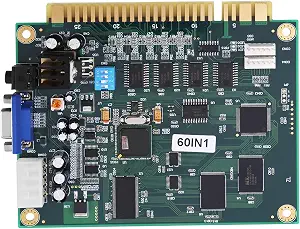 | Best for Flexible Cabinet Setups | Board type: 60-in-1 multicade PCB | Interface: Universal JAMMA connector | Video output: CGA and VGA | VIEW ON AMAZON | See Our Full Breakdown |
| BLEE 3D 9800 in 1 Arcade Jamma Board with 43 3D Games |  | Best for Multiplayer and Library Variety | Listed game quantity: 3,188 games | 3D games: 43 | Player support: Up to 4 players | VIEW ON AMAZON | See Our Full Breakdown |
| 3D 5000 in 1 Arcade Game Jamma Board with 70 3D Games, Supports HDMI & VGA |  | Best for Maximum Game Variety | Game quantity: 5,000 games | 3D games: 70 | Video output: HDMI and VGA | VIEW ON AMAZON | See Our Full Breakdown |
| Jeanoko Jamma 60-in-1 Multicade Board with CGA and VGA Output for Arcade Game Machines |  | Best for a Straightforward 60-Game Retrofit | Board type: 60-in-1 multicade PCB | Output: Standard JAMMA and VGA | Cabinet compatibility: Upright and cocktail | VIEW ON AMAZON | See Our Full Breakdown |
| Classic 60-in-1 Multicade PCB Board | | Best for Easy Game Selection | Brand: Yctze | Model: Yctzemp95ign2z6 | Number of games: 60 | VIEW ON AMAZON | See Our Full Breakdown |
| KOOBOOK Multi Classic 19-in-1 Multicade Arcade Multigame Jamma PCB Board |  | Best for Classic Game Variety | Game count: 19 | Supported monitors: CRT and VGA | Compatible cabinets: Upright and cocktail | VIEW ON AMAZON | See Our Full Breakdown |
| Classic 60-in-1 Multicade Game PCB Board with Jamma Standard Video Output | | Best for a Broad Classic Library | Game count: 60 | Video output: JAMMA standard | Supported monitors: CGA and VGA | VIEW ON AMAZON | See Our Full Breakdown |
| Classical Arcade Board 19 in 1 Arcade PCB Jamma Board Horizontal |  | Best for Horizontal JAMMA Setups | Game count: 19 | Screen orientation: Horizontal | Video support: CGA and VGA | VIEW ON AMAZON | See Our Full Breakdown |
| arcade game pcb board | Dimensions | Video output |
|---|---|---|
| 412 in 1 Jamma Board Multi Gam | 11.02 x 5.91 x 1.57 inches | — |
| 3D DX Plus Arcade System with | 4 x 3 x 5 inches | HDMI and VGA, up to 1280 x 720P |
| 2X 60-in-1 Multigame PCB Board | 6 x 5 x 1 inches | — |
| Classic 60-in-1 JAMMA Multicad | 145 x 120 x 20 mm | CGA and VGA |
| Classical Arcade Video Game 60 | — | CGA and VGA |
| KIMISS 60-in-1 Multicade PCB B | 145 × 120 × 20 mm | CGA and VGA |
| BLEE 3D 9800 in 1 Arcade Jamma | — | HDMI and VGA |
| 3D 5000 in 1 Arcade Game Jamma | 12 × 18 × 3 cm | HDMI and VGA |
| Jeanoko Jamma 60-in-1 Multicad | 145 × 120 × 20 mm | — |
| Classic 60-in-1 Multicade PCB | 5.71 × 4.72 × 0.79 in | — |
| KOOBOOK Multi Classic 19-in-1 | — | — |
| Classic 60-in-1 Multicade Game | — | JAMMA standard |
| Classical Arcade Board 19 in 1 | 143 x 110 mm | — |
More Details on Our Top Picks
412 in 1 Jamma Board Multi Game PCB Cocktail Arcade Video Board Vertical for CGA VGA Output
I’d choose this board when a cabinet is built around vertical games and a trackball, rather than when the goal is the broadest cabinet compatibility. Its CGA and VGA outputs give owners a way to connect either a traditional arcade display or a VGA monitor, while the standard JAMMA connection fits common arcade wiring. Free-play and token modes also make it adaptable for a home cabinet or a coin-operated setup. Compared with the Classic 60-in-1 JAMMA Multicade Board, this model offers a much larger stated game count and trackball support, but its screen flip is limited to 180 degrees rather than 90. Setup may also take more troubleshooting, since detailed instructions are limited. I’d skip it if you need straightforward installation or a specific 90-degree screen rotation.
Pros:- Supports both CGA and VGA display outputs.
- Works with standard JAMMA connectors and trackball controllers.
- Offers free-play and token-operation modes.
- Designed for vertical-screen arcade setups.
Cons:- Screen flip is limited to 180 degrees, not 90.
- Limited troubleshooting instructions may complicate installation.
- Requires familiarity with arcade-board setup and wiring.
Best for: Arcade restorers building a vertical-screen JAMMA cabinet who want trackball compatibility and both CGA and VGA connections.
Not ideal for: First-time cabinet builders who need detailed setup guidance, or operators who require 90-degree screen rotation.
- Game count:412 games
- Video outputs:CGA and VGA
- Cabinet interface:Standard JAMMA
- Screen orientation:Vertical; 180-degree flip
- Control support:Button controls and trackball
- Play modes:Free play or token operation
- Dimensions:11.02 x 5.91 x 1.57 inches
- Weight:0.3 kg
Our verdict“I’d pick this for a technically confident builder seeking a trackball-ready vertical JAMMA board, but not for a first-time installer who needs clear guidance.”
3D DX Plus Arcade System with 3516 Games – Horizontal & Vertical Modes, 3-Side Cocktail, Jamma Box, USB Trackball, CRT Output
This is the most adaptable system in this group for someone who moves between cabinet styles or is assembling a mixed-use arcade setup. The stated 3,516-game library is split between horizontal and vertical selections, and the unit supports cocktail tables, JAMMA cabinets, and CRT monitors. That range sets it apart from the 412 in 1 Jamma Board, which focuses on vertical play and offers a smaller library. HDMI and VGA output at 1280 x 720P also give this system more display options than the CGA/VGA-only 60-in-1 boards. The tradeoff is that its all-in-one format still depends on external controllers for multiplayer, and the product details don’t say which accessories are included. I’d choose it for flexibility, not for buyers who want a clearly documented, self-contained control setup.
Pros:- Includes separate horizontal and vertical game selections.
- Supports cocktail cabinets, JAMMA setups, and CRT monitors.
- Provides HDMI and VGA output at 1280 x 720P.
- Supports up to four players and high-score saving.
Cons:- Multiplayer requires external USB controllers.
- Included accessories and peripherals are not clearly specified.
- Warranty and support details are limited.
Best for: Arcade owners switching among JAMMA cabinets, CRT displays, and three-sided cocktail tables who want horizontal and vertical libraries in one system.
Not ideal for: Buyers who want a traditional PCB with clearly specified included controls or a simple, single-cabinet configuration.
- Game count:3,516 total: 3,000 horizontal and 516 vertical
- Video output:HDMI and VGA, up to 1280 x 720P
- Cabinet compatibility:Three-sided cocktail, JAMMA, and CRT monitor setups
- Controller support:Up to four players via USB controllers
- Trackball support:USB trackball
- Storage:32 GB
- Power:Corded electric
- Dimensions:4 x 3 x 5 inches
Our verdict“I’d choose the DX Plus for varied cabinet and display setups, while buyers seeking a conventional, well-documented JAMMA board may prefer a simpler 60-in-1 option.”
2X 60-in-1 Multigame PCB Board for Jamma Arcade with CGA/VGA Output and Trackball Support
The distinguishing feature here is the two-board bundle: it may suit an operator maintaining two cabinets or a restorer who wants a spare board on hand. Each board is a familiar 60-in-1 JAMMA-style option with CGA and VGA support, trackball connectivity, and settings for free play or coin operation. Compared with the single Classic 60-in-1 JAMMA Multicade Board, the package is geared more toward projects needing two boards than toward a buyer seeking a different game library or expanded player count. Automatic screen flipping can help with multiplayer play, while the built-in mounting holes simplify securing a board inside a cabinet. The limits are practical: it is an indoor-use product, needs the specified 5V/12V supply, and its stated two-player support won’t suit larger groups.
Pros:- Two boards provide a matching option for separate cabinets or a spare.
- Supports CGA and VGA displays with JAMMA, audio, and trackball connections.
- Built-in mounting holes help secure boards during installation.
- Offers free-play or coin-operation settings and automatic screen flipping.
Cons:- Requires a compatible 5V/12V power supply and suitable connections.
- Limited to indoor use and two-player support.
- The bundle may be unnecessary for buyers outfitting just one cabinet.
Best for: Cabinet restorers or small arcade operators who need two matching 60-in-1 boards for separate indoor JAMMA machines.
Not ideal for: Buyers needing a single board, more than two-player support, or a setup that avoids checking power-supply requirements.
- Package:Two 60-in-1 multigame boards
- Resolution:800 x 640
- Video support:CGA and VGA
- Connections:JAMMA, VGA, audio, and trackball
- Power requirement:5V/12V
- Player support:Two players
- Dimensions:6 x 5 x 1 inches
- Use:Indoor
Our verdict“I’d choose this bundle for two indoor cabinet projects, but a single-board 60-in-1 is a better fit if you only need to replace one PCB.”
Classic 60-in-1 JAMMA Multicade Board PCB with CGA/VGA Output for Universal Game Machines
I’d put this board on the shortlist for a conventional two-player cabinet where simple game selection matters more than modern display connections. Its universal JAMMA connector and support for CGA and VGA displays give it a practical fit with many existing arcade setups, while joystick or trackball controls make it more flexible than a board limited to one control style. The on-screen selection menu is another advantage for shared cabinets: players can choose from the library without dealing with a more elaborate system. Compared with the 412 in 1 Jamma Board, however, this model is limited to two players and does not offer the same stated larger game count or vertical-screen focus. Its biggest restriction is no HDMI output, so it is a better match for older arcade displays than newer screens.
Pros:- Universal JAMMA connector suits many existing arcade cabinets.
- Supports CGA and VGA displays.
- Compatible with joystick and trackball controls.
- On-screen game selection makes operation approachable.
Cons:- No HDMI output for modern HDMI-only displays.
- Supports only two players.
- Product specifications do not state a game count.
Best for: Owners replacing a board in a two-player JAMMA cabinet with a CRT, CGA, or VGA display and familiar joystick or trackball controls.
Not ideal for: Builders using HDMI-only monitors, cabinets designed for more than two players, or buyers who need a stated vertical-screen feature.
- Player support:Two players
- Video output:CGA and VGA
- Cabinet interface:Universal JAMMA
- Display type:CRT
- Controls:Joystick or trackball
- Indoor/outdoor use:Indoor
- Dimensions:145 x 120 x 20 mm
- Model number:WALFRONTvg3rgzdb9f
Our verdict“I’d choose this for a basic two-player CRT or VGA JAMMA replacement, but not for HDMI displays or larger multiplayer cabinets.”
Classical Arcade Video Game 60 in 1 PCB Jamma Board with CGA VGA Output
This is a compact choice for a standard JAMMA cabinet when the priority is a modest footprint and compatibility with both older CGA displays and VGA monitors. Its 143 x 110 mm board size can be useful in a crowded cabinet where a larger system is harder to place, and its vertical-screen support makes it a more focused option than the general-purpose Classic 60-in-1 JAMMA Multicade Board. It also supports upright and cocktail cabinets, giving it a useful range without the larger system footprint of the DX Plus. The tradeoff is sparse setup guidance: there is no included manual, and the product notes that correct voltage checks matter for saving settings. I’d pick it for a technically comfortable restorer, but a buyer who needs clear instructions may find the dual-pack 60-in-1 listing’s mounting details more helpful.
Pros:- Compact board dimensions suit space-constrained cabinets.
- Supports both CGA and VGA monitors.
- Works with upright and cocktail cabinet setups.
- Supports one- or two-player use and vertical screens.
Cons:- No manual is included, which can make setup harder.
- Correct voltage checks are needed to preserve settings.
- Detailed installation guidance is limited.
Best for: Arcade restorers fitting a compact 60-in-1 board into an upright or cocktail JAMMA cabinet with CGA or VGA display output.
Not ideal for: First-time installers who need a supplied manual, or buyers seeking HDMI, a larger library, or detailed setup documentation.
- Game count:60 games
- Cabinet interface:JAMMA
- Video output:CGA and VGA
- Connections:JAMMA, VGA, and audio
- Power requirement:5V/12V
- Player support:One or two players
- Board size:143 x 110 mm
- Material:ABS plastic
Our verdict“I’d select this for a compact vertical-capable JAMMA restoration if I can handle setup without a manual.”
KIMISS 60-in-1 Multicade PCB Board for Arcade Game Machines
The KIMISS is a practical fit for a cabinet owner who values monitor and control flexibility more than a huge game library. Its JAMMA connector, CGA and VGA outputs, and support for joystick or trackball controls make it adaptable to upright and cocktail cabinets. Free-play and token modes, score saving, and per-game enable or disable options add useful control over how the cabinet is used. Compared with the 3D 5000 in 1 Arcade Game Jamma Board, KIMISS offers far fewer games and no listed HDMI output, but its more explicit cabinet and control compatibility may suit a traditional setup better. The tradeoff is a small, 60-game selection and installation that may require wiring knowledge; monitor settings can also affect color appearance.
Pros:- CGA and VGA outputs support different arcade monitor setups.
- Works with joystick and trackball controls.
- Free-play and token modes suit home or coin-operated use.
- Game enable/disable and score-saving features offer useful cabinet management.
Cons:- The selection is limited to 60 games compared with the larger libraries in this roundup.
- Installation may call for technical knowledge of arcade wiring.
- Color output can vary with monitor settings.
Best for: Arcade cabinet owners who want a manageable set of classic games with CGA or VGA display support and joystick or trackball options.
Not ideal for: Buyers seeking a large library, 3D titles, or a board for a non-arcade setup; this is a 60-game JAMMA-oriented option.
- Board type:60-in-1 multicade PCB
- Interface:Universal JAMMA connector
- Video output:CGA and VGA
- Controls:Trackball and joystick
- Play modes:Free play and quarter/token mode
- Cabinet compatibility:Upright and cocktail
- Features:Score saving and game enable/disable
- Dimensions:145 × 120 × 20 mm
- Weight:144 g
Our verdict“Choose KIMISS for a traditional JAMMA cabinet where flexible controls and display options matter more than a large game count.”
BLEE 3D 9800 in 1 Arcade Jamma Board with 43 3D Games
BLEE is the library-first choice here, with a listed 3,188 games, 43 3D titles, support for up to four players, and HDMI and VGA outputs. USB game addition and archiving, language options, and high-score saving make it more configurable than the simpler Jeanoko Jamma 60-in-1 Multicade Board, which focuses on a compact classic-game set and CGA/VGA compatibility. That broader feature set better fits a shared cabinet where variety and multiplayer support matter. The tradeoff is a more involved setup: wiring may take arcade-system familiarity, and the listing notes that power-adapter replacement may be needed if power problems arise. Its 32 GB storage capacity also puts a boundary on additions, so buyers should not assume unlimited room for custom games.
Pros:- Lists 3,188 games, including 43 3D titles.
- Supports up to four players.
- HDMI and VGA outputs cover different display setups.
- USB game addition, archiving, language support, and high-score saving add configuration options.
Cons:- Setup and wiring may require arcade hardware experience.
- The 32 GB storage capacity limits how much additional content can be kept.
- Power issues may call for replacing the power adapter.
Best for: Arcade operators or hobbyists building a multiplayer cabinet who want a broad game selection, some 3D titles, and HDMI or VGA display options.
Not ideal for: Buyers seeking a simple, clearly specified classic-game replacement board or anyone uncomfortable with JAMMA wiring and power troubleshooting.
- Listed game quantity:3,188 games
- 3D games:43
- Player support:Up to 4 players
- Video output:HDMI and VGA
- Storage capacity:32 GB
- Controls:Button control
- Display compatibility:LCD or LED
- Board weight:0.33 kg
Our verdict“Pick BLEE when multiplayer support and a broad game library outweigh simpler setup and storage limitations.”
3D 5000 in 1 Arcade Game Jamma Board with 70 3D Games, Supports HDMI & VGA
This board is the strongest match for buyers whose main goal is a very large game library: it lists 5,000 games, including 70 3D titles, and provides both HDMI and VGA output. Its standard JAMMA compatibility gives it a familiar path into a suitable arcade cabinet, while the compact 12 × 18 cm footprint may help with board placement. Compared with the BLEE 3D 9800 in 1 Arcade Jamma Board, it lists more games and 3D titles, but BLEE specifies four-player support, USB additions, archiving, and language features that are not listed here. The stated 1 GB storage capacity is a notable constraint beside the game-count claim, and setup or troubleshooting may still take technical skill. This is a cabinet-focused board, not a plug-in game device for general use.
Pros:- Lists 5,000 games, including 70 3D titles.
- HDMI and VGA outputs provide two display connection options.
- Designed for standard JAMMA interfaces.
- Compact listed dimensions can ease placement inside a cabinet.
Cons:- The listed 1 GB storage capacity may constrain expectations for a large library or added content.
- Installation and troubleshooting can require arcade hardware knowledge.
- The product is intended for arcade-machine use rather than general consumer setups.
Best for: Arcade hobbyists with a JAMMA cabinet who prioritize a large listed library and HDMI/VGA display choices over documented customization features.
Not ideal for: Buyers who need stated multiplayer support, USB game management, or a straightforward consumer device; those features are not specified for this board.
- Game quantity:5,000 games
- 3D games:70
- Video output:HDMI and VGA
- Interface:Standard JAMMA
- Storage capacity:1 GB
- Dimensions:12 × 18 × 3 cm
- Weight:0.28 kg
- Display type:LCD
- Work environment:-10°C to 45°C; 30% to 90% humidity
Our verdict“Choose this board for its large listed game count and dual video outputs, provided its limited stated storage and arcade-focused setup fit your project.”
Jeanoko Jamma 60-in-1 Multicade Board with CGA and VGA Output for Arcade Game Machines
Jeanoko suits buyers looking for a classic 60-game JAMMA replacement with both CGA and VGA output, rather than the expansive libraries offered by the BLEE or 3D 5000-in-1 boards. Its stated support for upright and cocktail cabinets, plus joystick and trackball controls, gives it room to fit more than one traditional cabinet arrangement. The user-friendly game selection and score saving are practical touches for a shared machine, and an owner’s manual is listed in the package. Compared with the KIMISS 60-in-1 Multicade PCB Board, the core format is similar; KIMISS explicitly lists free-play/token modes and game enable/disable, while Jeanoko’s listing emphasizes the manual and cabinet compatibility. Jeanoko remains a 60-game option, and installation may still require technical skill. Color accuracy can depend on the connected monitor.
Pros:- CGA and VGA outputs support different monitor types.
- Listed compatibility with upright and cocktail cabinets.
- Supports joystick and trackball controls.
- Includes a manual and lists game selection and score-saving features.
Cons:- The 60-game library may feel narrow beside the larger multi-game boards.
- Installation and setup can require arcade wiring knowledge.
- Color accuracy may vary with the monitor.
Best for: Owners replacing or fitting a JAMMA board in an upright or cocktail cabinet who want 60 classic games, CGA/VGA support, and familiar controls.
Not ideal for: Buyers who need a large modern or 3D library, HDMI output, or explicit game-management and play-mode options.
- Board type:60-in-1 multicade PCB
- Output:Standard JAMMA and VGA
- Cabinet compatibility:Upright and cocktail
- Controls:Trackball and joystick
- Features:Game selection and score saving
- Dimensions:145 × 120 × 20 mm
- Weight:144 g
- Package contents:Multicade PCB and owner’s manual
Our verdict“Jeanoko is a sensible choice for a traditional cabinet retrofit when 60 classic games and CGA/VGA compatibility are enough.”
Classic 60-in-1 Multicade PCB Board
This Classic 60-in-1 board puts emphasis on accessible game selection and familiar cabinet controls, making it a good fit for a home or shared JAMMA machine where players should be able to choose from the menu without a sprawling library. It lists CGA and VGA support, score saving, and compatibility with trackball, joystick, and other controllers. Like the Jeanoko Jamma 60-in-1 Multicade Board, it stays within a 60-game format and supports traditional display options; Jeanoko explicitly lists upright and cocktail cabinet compatibility, while this board spells out free-play and token/quarter operation. Its main limitation is that it is restricted to JAMMA-compatible cabinets, and its product data includes unusual PCIe and integrated-graphics terminology that does not clarify the practical arcade connection beyond the stated cabinet compatibility. Buyers should verify wiring fit before ordering.
Pros:- User-friendly game selection screen helps players choose from the listed library.
- Supports CGA and VGA displays.
- Works with trackball, joystick, and other controllers.
- Score saving and free-play/token modes support different cabinet uses.
Cons:- Limited to 60 games compared with the large-library boards in this roundup.
- Designed for JAMMA-compatible cabinets, limiting use in other setups.
- The listed PCIe terminology may leave buyers wanting clearer connection details.
Best for: JAMMA-cabinet owners who want a 60-game board with a user-friendly selection screen, score saving, and common arcade controls.
Not ideal for: Owners of non-JAMMA cabinets or buyers seeking HDMI output, a large game collection, or unambiguous connection documentation.
- Brand:Yctze
- Model:Yctzemp95ign2z6
- Number of games:60
- Dimensions:5.71 × 4.72 × 0.79 in
- Weight:144 g
- Main power connector:24-pin
- Compatible devices:JAMMA game cabinets
- Controller compatibility:Trackball and joystick
- Graphics interface listed:Integrated graphics
Our verdict“Choose this board for a JAMMA cabinet where easy game selection and familiar controls matter more than a large library or broad cabinet compatibility.”
KOOBOOK Multi Classic 19-in-1 Multicade Arcade Multigame Jamma PCB Board
I’d choose the KOOBOOK 19-in-1 when a cabinet is meant for a focused set of classic games rather than a huge general-purpose library. Its listed selection includes titles such as Defender, Joust, Robotron, Gradius, and Super Mario Bros., and its CRT and VGA support gives it more display flexibility than a board limited to one monitor type. The listed trackball and joystick support also suits mixed-control cabinet plans, though buyers should verify their cabinet wiring and game controls before installation.
Compared with the Classic 60-in-1, KOOBOOK offers fewer games and no stated high-score saving, but its named game list makes the selection easier to evaluate. The tradeoff is limited configuration: settings are not retained after power-off, and advanced options are absent. I’d favor it for a straightforward classic-focused build, not for a cabinet that needs persistent settings or a broad menu.
Pros:- Named selection of 19 classic games, including Defender, Joust, and Gradius
- Supports both CRT and VGA monitors
- Listed for upright and cocktail cabinets
- Trackball and joystick control support
Cons:- Settings are not retained after power-off and require a reset
- No advanced configuration options are listed
- Requires a standard arcade power supply
Best for: Cabinet builders who want a curated set of classic titles, CRT or VGA display options, and compatibility with upright or cocktail cabinets.
Not ideal for: Operators who need saved settings, a large game library, or extensive configuration options; the board is described as resetting after power-off.
- Game count:19
- Supported monitors:CRT and VGA
- Compatible cabinets:Upright and cocktail
- Controls:Trackball and joystick
- Listed games:Defender, Stargate, Bubbles, Joust, Robotron, Blaster, Splat, Rally X, Battle City, Mario Bros., Ghost’n Goblins, Solomon’s Key, Gradius, Sky Kid, Ice Climber, Super Mario Bros., DO!RunRun, Kick Rider
- Size:0.61 x 0.61 x 1.3 inches
- Net weight:0.15 kg
- Power supply:Standard arcade power supply
Our verdict“Choose KOOBOOK for its defined classic-game lineup and CRT/VGA flexibility, but skip it if saved settings or a larger library matter more.”
Classic 60-in-1 Multicade Game PCB Board with Jamma Standard Video Output
The Classic 60-in-1 is the stronger fit when cabinet owners want a broad menu of games on a single JAMMA board. Its 60-game library, two-player support, and CGA/VGA compatibility make it more flexible for shared play than the KOOBOOK 19-in-1, which offers a smaller, specifically listed collection. Automatic screen flip is useful in cocktail cabinets, while high-score saving adds continuity for players returning to a game.
That wider selection comes with practical limits: gameplay is capped at two players, and the board does not include control peripherals. The product information also says installation requires technical knowledge, so a first-time builder may prefer a simpler, better-documented setup. I’d pick this over the horizontal 19-in-1 board when game count and score saving matter most, provided the buyer can handle JAMMA installation.
Pros:- Preloaded library of 60 games
- Supports CGA and VGA monitors
- Automatic screen flip suits cocktail cabinets
- High-score saving and two-player support
Cons:- Installation requires technical knowledge
- No control peripherals are included
- Limited to two-player gameplay
Best for: Arcade owners upgrading a JAMMA upright or cocktail cabinet who want many classic choices, two-player play, and saved high scores.
Not ideal for: First-time builders without JAMMA installation experience, or buyers needing more than two players or included controls.
- Game count:60
- Video output:JAMMA standard
- Supported monitors:CGA and VGA
- Compatible cabinets:Upright and cocktail
- Players:2
- Controller type:Joystick
- Features:Automatic screen flip and high-score saving
- Size:7.48 x 7.08 x 0.78 inches
- Material:Circuit board
Our verdict“Pick this board for a larger classic library and score saving in a compatible two-player JAMMA cabinet, if you can manage installation yourself.”
Classical Arcade Board 19 in 1 Arcade PCB Jamma Board Horizontal
I’d shortlist the Classical Arcade Board 19-in-1 for a horizontal-screen cabinet that needs a compact, conventional JAMMA connection and a choice between CGA and VGA displays. Its free-play or token mode is a practical distinction from the KOOBOOK 19-in-1, whose supplied details do not list that option. The stated support for upright and cocktail cabinets broadens installation possibilities, while two trackball connectors may suit a cabinet built around trackball controls.
This board’s game list is described only as 19 popular classics, so it is harder to judge the exact library than KOOBOOK’s named selection. The instructions also call out voltage checks, switch settings, connector orientation, and a save-key action; that points to a more hands-on setup than the 60-in-1 board’s user-friendly selection description. I’d choose it for a builder comfortable troubleshooting JAMMA wiring, not for someone seeking a plug-and-play purchase.
Pros:- Supports CGA and VGA monitors
- Offers free-play and token modes
- Includes a universal JAMMA connector and two trackball connectors
- Listed for upright and cocktail cabinets
Cons:- The individual 19-game lineup is not specified in the supplied details
- Setup may require checking voltage, switches, and connector orientation
- Settings require a save action to retain changes
Best for: Experienced arcade cabinet builders with a horizontal-screen JAMMA setup who want CGA/VGA support and selectable free-play or token operation.
Not ideal for: Buyers who need a clearly itemized game list or prefer minimal setup and troubleshooting; installation guidance requires attention to voltage and board settings.
- Game count:19
- Screen orientation:Horizontal
- Video support:CGA and VGA
- Cabinet compatibility:Upright and cocktail
- Interface:JAMMA
- Players:One or two
- Connectors:JAMMA, VGA, audio, and two trackball connectors
- Voltage:5V and 12V
- Dimensions:143 x 110 mm
Our verdict“Choose this board for a horizontal JAMMA build needing token/free-play choice and CGA/VGA output, but only if its unspecified game list suits your plans.”

How We Picked
I compared these boards by the details that affect whether an arcade game PCB board will work in a real cabinet: JAMMA compatibility, stated video outputs, horizontal or vertical orientation, control support, and the intended game mix. I gave extra weight to listings that specify features with practical consequences, such as trackball support, cocktail layouts, or HDMI alongside VGA. A large advertised game count can add variety, but it does not replace clear information about connections and cabinet fit.
The ranking favors versatility and decision clarity over the biggest number on a product title. The 412-in-1 ranks first as a broadly useful combination of library size and CGA/VGA output; the 3D DX Plus earns a distinct place for cocktail and trackball-oriented setups; and the 60-in-1 boards remain relevant for buyers prioritizing a classic multicade configuration. Higher-count 3D boards and smaller 19-in-1 options rank for more specific needs. Where listings provide limited detail, I treat that lack of specificity as a drawback and recommend confirming the board’s exact connections and controls before purchase.
| arcade game pcb board | Video output |
|---|---|
| 412 in 1 Jamma Board Multi Gam | — |
| 3D DX Plus Arcade System with | HDMI and VGA, up to 1280 x 720P |
| 2X 60-in-1 Multigame PCB Board | — |
| Classic 60-in-1 JAMMA Multicad | CGA and VGA |
| Classical Arcade Video Game 60 | CGA and VGA |
| KIMISS 60-in-1 Multicade PCB B | CGA and VGA |
| BLEE 3D 9800 in 1 Arcade Jamma | HDMI and VGA |
| 3D 5000 in 1 Arcade Game Jamma | HDMI and VGA |
| Jeanoko Jamma 60-in-1 Multicad | — |
| Classic 60-in-1 Multicade PCB | — |
| KOOBOOK Multi Classic 19-in-1 | — |
| Classic 60-in-1 Multicade Game | JAMMA standard |
| Classical Arcade Board 19 in 1 | — |
Factors to Consider When Choosing Arcade Game Pcb Board
Before choosing a board, match it to the cabinet and the games you actually want to play. Compatibility is a system-level question: the PCB, monitor, controls, wiring, and cabinet orientation all need to agree. These checks can prevent a board with an appealing library from becoming an awkward or incomplete upgrade.
Match Video Output to Your Monitor
Start by identifying the display already installed in your cabinet, not just the connectors you would prefer to have. CGA and VGA are not interchangeable assumptions; check the exact output options and whether your monitor can accept them without additional conversion hardware. HDMI support, as listed for the 5000-in-1 board, may suit a newer display but does not by itself confirm compatibility with a CRT. Ask whether the board provides the resolution and signal type your monitor expects. A common mistake is to buy around the source board’s output while overlooking the display input and any converter needed between them. If you are keeping an original CRT, prioritize confirmed analog compatibility over a larger game count.
Check JAMMA Wiring and Cabinet Controls
A board described as JAMMA still needs to match the cabinet’s wiring and control layout. Verify the edge connector, power requirements, button count, and control inputs against your machine’s harness before ordering. A trackball-oriented cabinet calls for explicit trackball support; ordinary joystick and button compatibility should not be taken as proof that a trackball will work. Also check whether your cabinet uses controls or wiring beyond a standard JAMMA setup. Buyers often focus on the PCB and discover later that they need adapters or cabinet changes. If you are replacing an existing board, compare its connector and control wiring with the new board’s documentation first.
Choose Games by Play Style, Not Count Alone
Game totals are a quick way to spot the difference between a focused board and a broad multicade, but they do not tell you how useful the selection will be. Look for the titles and game types you want to play, and check whether the menu makes it practical to find them. A 60-in-1 board may be a better match for a cabinet dedicated to classic arcade play than a board advertising thousands of games. The larger 3D libraries may appeal to buyers seeking more variety, but the listing’s headline count does not describe how well the games suit the cabinet’s controls. Ask for a complete game list when the selection matters to your purchase. This reduces the chance of paying for variety that does not fit your play style.
Match Orientation and Cabinet Shape
Horizontal and vertical games use screen space differently, so board support needs to align with the cabinet’s monitor and intended setup. Check whether the board supports your screen orientation and whether changing orientation involves settings, physical rotation, or extra configuration. The 3D DX Plus is specifically described with horizontal and vertical modes and a three-sided cocktail setup, while the 19-in-1 Classical board is identified as horizontal. Cocktail cabinets add another question: confirm how the controls are arranged for each player position. A broad game library may be less useful if most selections do not suit the installed screen layout. Settle the cabinet’s orientation before comparing game counts.
Decide Whether Specialty Controls Matter
Some cabinet builds depend on controls beyond a standard joystick and buttons, and these can narrow the sensible choices quickly. Trackball support is a specific requirement, not a feature to infer from a board’s game count or “multicade” label. The 3D DX Plus lists a USB trackball, while the 2X 60-in-1 listing calls out trackball support; verify the connection method and supported games for either option. For a standard two-player control panel, specialty inputs may add no benefit. Buyers sometimes select a board with a feature in the title without checking whether the matching peripheral is included or must be supplied separately. Confirm both what the board supports and what arrives in the package.
Weigh Library Size Against Setup and Support
A large advertised library can be appealing, but a more complex feature set may call for extra setup and clearer documentation. Pay for breadth only when you have a use for it; a focused 19-in-1 or 60-in-1 board may be easier to shortlist if you want a narrower game set. Before choosing a high-count 3D board, ask about menu navigation, configuration access, included cables, and instructions. For any board, establish what support is available if the image, sound, or controls do not work as expected. Limited listing detail is a reason to ask questions, not a reason to assume compatibility. The best value is the board that fits the cabinet with the least unplanned adaptation, not necessarily the one with the most games.
Frequently Asked Questions
Will any JAMMA arcade PCB board work in my JAMMA cabinet?
Not automatically. JAMMA describes a common connection standard, but your cabinet’s power, monitor input, control wiring, and any nonstandard modifications still matter. Compare the board’s connector and documentation with the cabinet harness before connecting it. Check video output separately, since a compatible edge connector does not guarantee that the board’s signal suits your display. If the cabinet has been modified or uses extra controls, confirm those details with the seller or a technician first.
Should I choose a 60-in-1 board or one with thousands of games?
Choose based on the games and controls you want, rather than treating a larger number as proof of a better board. A 60-in-1 option may fit a focused classic-game cabinet, while a high-count board may be more appealing when variety is the main goal. The larger count does not confirm that the selection suits your preferred play style or screen orientation. Ask for a game list and check how the menu is organized. Also compare output and cabinet compatibility before making library size the deciding factor.
Can I use a CGA/VGA board with my arcade CRT?
Possibly, but the answer depends on the specific CRT and the board’s supported signal modes. Check the monitor’s input and timing requirements against the PCB documentation rather than relying on a CGA/VGA label alone. A VGA output may require a different display or conversion approach than an original arcade monitor accepts. Confirm whether the board offers a suitable low-resolution signal and whether any adapter is needed. If that information is missing, ask before buying instead of assuming the connector will solve the compatibility issue.
What should I check before buying a board for a cocktail cabinet?
Confirm that the board supports the cabinet’s screen orientation and the way players sit or stand around its control panels. Look for explicit cocktail-mode support, not just a broad claim of horizontal and vertical games. Check whether the image flips for the opposite player and whether the controls work from each side. The 3D DX Plus specifically lists three-sided cocktail support, but you should still verify how that mode behaves with your cabinet. Also match the board’s output to the installed display.
Do I need a trackball-specific board for a cabinet with a trackball?
If you want to play games that rely on a trackball, choose a board that explicitly supports that control and confirm how it connects. A standard JAMMA connection alone does not confirm trackball functionality. Check whether the trackball is included, connects over USB or another interface, and is supported by the games you plan to play. The 3D DX Plus lists a USB trackball, and the 2X 60-in-1 listing names trackball support, but their connection details should still be checked. If your cabinet has only a joystick and buttons, trackball support may not justify narrowing your options.
Conclusion
For most cabinet owners, I recommend the 412-in-1 JAMMA board as the best overall because its stated game breadth and CGA/VGA output make a balanced starting point. The 60-in-1 boards are my best-value direction for buyers who want a classic multicade setup without prioritizing a huge library; compare their exact outputs and connector details before choosing among similarly named listings. For a best premium-style feature set, consider the 3D DX Plus if cocktail play, multiple orientations, and trackball use match your cabinet, or compare the 5000-in-1 board if HDMI and a large 3D selection are higher priorities. Beginners should start with the board whose outputs and JAMMA fit are easiest to verify, rather than the one with the biggest count. For specific needs, choose a trackball-capable listing for trackball games and a clearly horizontal or cocktail-ready option for the cabinet layout. In every case, confirm the monitor signal, wiring, and included accessories before deciding.