
TL;DR

Play games on Amazon Luna for your game nights, included with Prime
- A rotating selection of games, no download needed
- Play on TV, laptop or phone
- Fast, free delivery for your gear, too
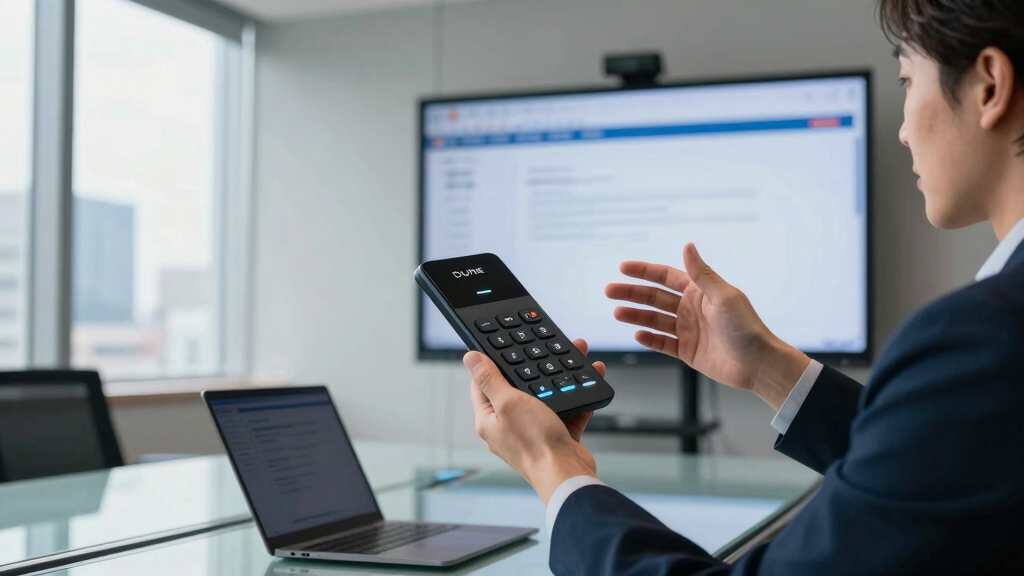
The Dune device is a small, customizable keypad that connects via USB-C to MacBooks, enabling quick access to meeting controls and app shortcuts. It supports automation, calendar integration, and user scripting, offering a new way to streamline workflows.
Project Mirage has introduced the Dune, a compact, programmable keypad that connects via USB-C to MacBooks, serving as a customizable meeting controller and productivity tool. The device features three buttons that adapt based on the active application, allowing users to toggle mute, control video, or execute app-specific commands. Priced at $119, it aims to address common frustrations with meeting apps and streamline workflows for professionals.
The Dune is a small, aluminum device designed to sit flush against a MacBook, drawing power directly from the laptop without requiring batteries or a separate charger. It supports M2 Air and later, as well as M1 Pro and later MacBook models running macOS 15 Sequoia or newer.
Each unit is built to match the user’s specific Mac model, ensuring a seamless fit. The device ships with a companion app that allows users to assign shortcuts—such as muting, camera toggling, or opening apps—either system-wide or per-application. Users can also configure shortcuts to open URLs, run commands, or trigger scripts, making it highly customizable.
In addition to basic controls, Dune integrates with a calendar to surface upcoming meetings, enabling quick join or messaging options. Advanced users can write custom Python scripts for deeper automation, or use an AI-powered service called Claude Desktop to generate shortcuts via plain-language descriptions. The device also features a marketplace for sharing skills, though the current selection is limited.
Why the Dune Device Could Change Meeting Dynamics
The Dune keypad offers a tangible solution to the chaotic and inconsistent experience of managing virtual meetings. By providing dedicated, programmable buttons, it reduces reliance on keyboard shortcuts or mouse navigation, potentially increasing productivity and reducing errors during calls.
Its automation capabilities and integration with AI tools like Claude Desktop could enable users to customize workflows extensively, making routine tasks faster and more consistent. For professionals who frequently evaluate companies or manage multiple apps, Dune can streamline complex tasks into simple button presses, saving time and mental effort.
As a hardware front end for a skills ecosystem, Dune could foster a community of shared productivity tools, encouraging further innovation. Its success may influence the design of future peripherals aimed at remote work and automation, emphasizing customization and ease of use.
programmable USB-C keypad for MacBook
As an affiliate, we earn on qualifying purchases.
As an affiliate, we earn on qualifying purchases.
Background on the Rise of Productivity Hardware
Over recent years, there has been a growing demand for hardware devices that enhance productivity and streamline workflows, especially for remote workers. Devices like Elgato’s Stream Deck have gained popularity for macro commands and shortcuts, but often lack deep integration with specific applications or AI-powered automation.
Project Mirage’s Dune enters this space with a focus on MacBook users, aiming to combine hardware simplicity with software flexibility. Its support for app-specific shortcuts, calendar integration, and scripting reflects a trend toward highly customizable productivity tools, driven by the increasing complexity of digital workflows.
While similar devices exist, Dune’s unique selling points include its seamless Mac integration, AI-assisted shortcut creation, and a marketplace for shared skills, positioning it as a versatile addition to professional setups.
“The Dune keypad could significantly reduce the cognitive load during meetings by offering dedicated controls that are always at hand.”
— an anonymous researcher
Unanswered Questions About Dune’s Long-Term Adoption
It is not yet clear how widely Dune will be adopted outside early adopters or how the marketplace for shared skills will develop. The current limited skill set and the lack of a preview feature for testing skills before assignment may hinder user engagement. Additionally, the device’s resistance to accidental presses and overall durability remain to be tested in real-world environments.
It is also uncertain how quickly the company will expand compatibility to older Mac models or other operating systems, and whether third-party developers will create a robust ecosystem of skills and integrations.
Next Steps for Dune’s Development and Adoption
Project Mirage is expected to expand its skill marketplace and improve user interface features, such as skill previews and more intuitive configuration options. The company may also release firmware updates to enhance hardware resistance and usability.
Further integrations with productivity apps and AI tools are likely, along with broader compatibility, as the startup gathers user feedback. A wider rollout and potential partnerships with enterprise users could also accelerate adoption.
Monitoring the growth of the skills marketplace and user reviews will be key indicators of Dune’s long-term success and influence on productivity hardware.
Key Questions
Can the Dune keypad control all meeting apps?
It can be configured to control various meeting apps through customizable shortcuts, but compatibility depends on the app’s support for keyboard commands or URL schemes.
Is the device compatible with older MacBook models?
Currently, Dune supports M2 Air and later, as well as M1 Pro or later MacBooks running macOS 15 Sequoia or newer. Compatibility with older models is not confirmed.
Can I test new skills before assigning them to the device?
No, the current version requires assigning skills directly to hardware buttons; previewing before assignment is not yet supported.
Does the device require batteries or external power?
No, Dune draws power directly from the connected MacBook via USB-C, with no batteries needed.
What is the price of the Dune device?
The device retails at $149 after the introductory price, making it a competitive option for productivity-focused users.
Source: TechCrunch
Fall Picks
fall essentials
As an affiliate, we earn on qualifying purchases.