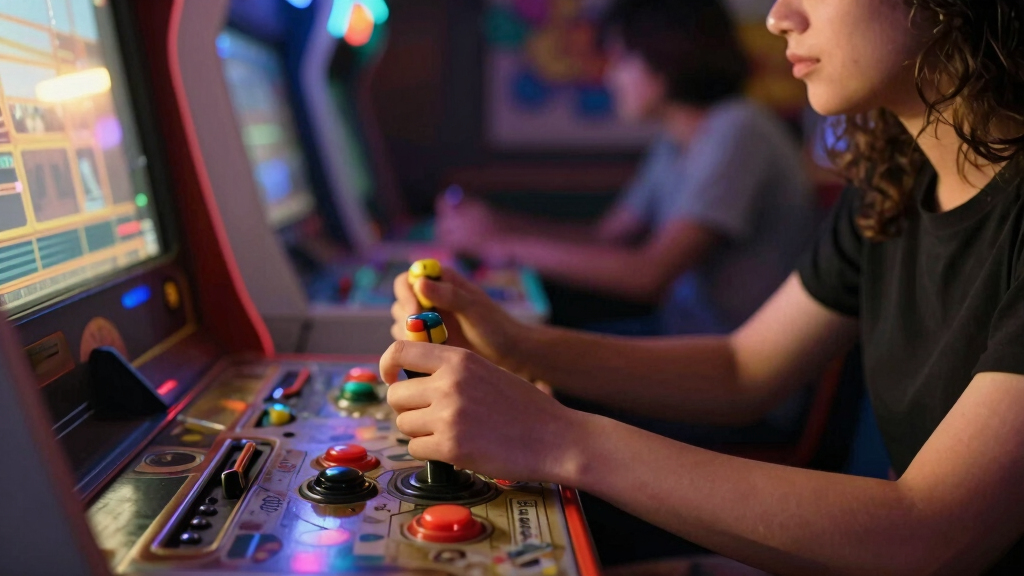

Finding the right arcade game controller can transform your gaming experience, whether you’re into fighting games, retro emulation, or custom arcade setups. The best options balance build quality, responsiveness, and compatibility, but tradeoffs often exist between affordability and features. The MAYFLASH F300 Fight Stick stands out as the overall best for its versatility and broad device support, while the 8Bitdo Arcade Fight Stick offers wireless convenience at a competitive price. However, deciding between ready-made fight sticks and DIY kits depends on how hands-on you want to be and your budget. Keep reading for a detailed breakdown to help you choose the ideal arcade controller for your needs.
Key Takeaways
- Top picks balance build quality with compatibility across modern consoles and PCs.
- Wireless options like 8Bitdo provide convenience but may sacrifice some responsiveness compared to wired sticks.
- DIY kits are ideal for custom setups but require technical skills and time investment.
- Premium fight sticks excel in durability and precision but come at a higher cost.
- Compatibility with multiple platforms remains a key factor influencing value and usability.
| MAYFLASH F300 Arcade Fight Stick Joystick for Switch, PS4, PS3, Xbox Series S/X, Xbox One, Xbox 360, macOS, Windows, Steam Deck |  | Best Overall for Versatility and Customization | Compatible Devices: Switch, PS4, PS3, Xbox Series S/X, Xbox One, Xbox 360, PC Windows, macOS, Steam Deck, Android | Controller Type: Joystick | Connectivity Technology: USB | VIEW LATEST PRICE | See Our Full Breakdown |
| GwalSNTH 32000-in-1 Pandora Box 60S Arcade Games Console with 1280×720 Display, Dual Joysticks, 1-4 Player Support |  | Best Value for Extensive Game Library and Multiplayer Options | Number of Games: 32,000 | Display Resolution: 1280×720 | Screen Size: 6 inches | VIEW LATEST PRICE | See Our Full Breakdown |
| 8BitDo All-Button Arcade Controller for Xbox Series X|S, Xbox One & PC, 2.4G Wireless, Mechanical Switches, Programmable Buttons, RGB Lighting – Officially Licensed |  | Best for Competitive Gaming with Customization and Portability | Compatible Devices: Windows, Xbox One, Xbox Series S, Xbox Series X | Controller Type: Joystick | Wireless: Yes | VIEW LATEST PRICE | See Our Full Breakdown |
| 8Bitdo Arcade Fight Stick for Switch & Windows – Wireless Bluetooth, 2.4G Receiver, Wired Connection |  | Best for Versatile Wireless and Modding Enthusiasts | Compatible Devices: Switch, Windows | Controller Type: Joystick | Connectivity Technology: Bluetooth, USB | VIEW LATEST PRICE | See Our Full Breakdown |
| 2026 Retro Gaming Console with 23 Emulators and 40,000+ Games, 4K HDMI, Dual Wireless Controllers, 128GB |  | Best for Nostalgic and Family Gaming with Extensive Library | Platform: Not specified | Input Device: Gamepad | Connectivity Technology: HDMI, USB | VIEW LATEST PRICE | See Our Full Breakdown |
| 8Bitdo Retro Arcade Fight Stick with 8-Way Joystick, Macro Buttons, Turbo, for Switch and PC | 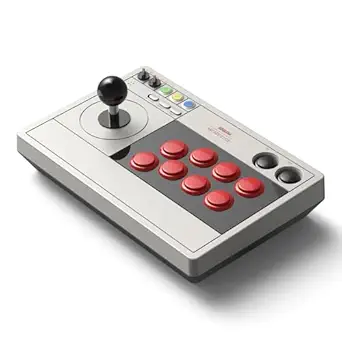 | Best Overall for Versatile Connectivity and Customization | Compatible Devices: PC, Windows, Nintendo Switch | Controller Type: Joystick | Connectivity Technology: Bluetooth, Wired, 2.4G Wireless | VIEW LATEST PRICE | See Our Full Breakdown |
| Hikig 2 Player LED Arcade Buttons and Joysticks DIY Kit, 2x Joysticks + 20 LED Buttons for MAME and Raspberry Pi – Red & Blue |  | Best for DIY Enthusiasts Seeking a Complete 2-Player Setup | Number of Players: 2 | Controller Type: Joystick | Power Source: Corded Electric | VIEW LATEST PRICE | See Our Full Breakdown |
| HORI Fighting Stick Mini for PS5, PS4, and PC – Officially Licensed by Sony |  | Best Compact Fight Stick for Portability and Play on PlayStation and PC | Compatible Devices: PC, PlayStation 4, PlayStation 5 | Controller Type: Joystick | Connectivity Technology: USB | VIEW LATEST PRICE | See Our Full Breakdown |
| Qenker 2-Player LED Arcade DIY Kit for USB MAME PC Game & Raspberry Pi | | Best for Responsive Dual Player DIY Projects | Number of Joysticks: 2 | Number of Buttons: 20 | USB Encoders: 2 Zero Delay USB Encoders | VIEW LATEST PRICE | See Our Full Breakdown |
| EG STARTS 2 Player Arcade Games DIY Kit with LED-lit Arcade Buttons and Ellipse Joystick Handles |  | Best for Easy Assembly and Visual Customization in DIY Projects | Compatible Devices: PC, Windows | Controller Type: Joystick | Connectivity Technology: USB | VIEW LATEST PRICE | See Our Full Breakdown |
More Details on Our Top Picks
MAYFLASH F300 Arcade Fight Stick Joystick for Switch, PS4, PS3, Xbox Series S/X, Xbox One, Xbox 360, macOS, Windows, Steam Deck
The MAYFLASH F300 stands out as the most adaptable arcade controller, supporting a wide array of consoles and PC platforms, making it ideal for gamers who switch between systems or want a single stick for multiple setups. Its support for Sanwa Denshi parts and turbo functions adds a level of customization not matched by simpler controllers like the 8BitDo Arcade Fight Stick. However, its weight of 2 kilograms makes portability less convenient, and its reliance on USB connections means no wireless freedom. Compared to the 8Bitdo All-Button Arcade Controller, the F300 offers more extensive compatibility and customizable features but sacrifices some ease of use and portability. This pick makes the most sense for dedicated fighters or arcade fans who prioritize flexibility over compactness.
Pros:- Supports a broad range of consoles and PC platforms
- Customizable Sanwa Denshi buttons and joystick
- Includes turbo functions with adjustable speed
Cons:- Heavy at 2 kilograms, less portable
- Requires USB cable connection, no wireless option
- Limited detail on build durability
Best for: Advanced fighting game enthusiasts who own multiple consoles or PC and value extensive customization.
Not ideal for: Casual gamers seeking a lightweight, wireless, plug-and-play arcade controller for occasional play.
- Compatible Devices:Switch, PS4, PS3, Xbox Series S/X, Xbox One, Xbox 360, PC Windows, macOS, Steam Deck, Android
- Controller Type:Joystick
- Connectivity Technology:USB
- Button Quantity:4
- Item Weight:2 Kilograms
- Supported Console Models:Xbox 360, Xbox One, Xbox Series X, Switch 2, PS3, PS4
- Additional Features:Customizable Buttons & Joystick, Turbo Function, Multi-platform Compatibility
Bottom line: Ideal for serious fighters and multi-platform users who need a highly customizable, wired arcade stick.
GwalSNTH 32000-in-1 Pandora Box 60S Arcade Games Console with 1280×720 Display, Dual Joysticks, 1-4 Player Support
The GwalSNTH Pandora Box offers an enormous collection of 32,000 preloaded games, dwarfing the game options of the 2026 Retro Gaming Console. Its high-definition 1280×720 display and support for 1-4 players with dual joysticks make it perfect for group gaming sessions. While the large size and need for ample space might be a drawback compared to more compact options, this console’s vast library and multiplayer flexibility make it a top choice for family entertainment. Unlike the 8Bitdo Arcade Fight Stick or 8Bitdo Wireless Controller, it’s designed for shared, casual fun rather than competitive solo gaming. This console is best for those seeking a nostalgic, all-in-one arcade experience for social play and variety.
Pros:- Massive library of 32,000 games including 3D titles
- Supports 1-4 players with dual joysticks
- High-definition 1280×720 display with multiple connection options
Cons:- Large footprint requires significant space
- Limited info on game customization and updates
- No built-in audio or speaker details
Best for: Families or casual gamers looking for a large game library and multiplayer fun in a single setup.
Not ideal for: Serious competitive players or those with limited space who prefer a single-stick setup.
- Number of Games:32,000
- Display Resolution:1280×720
- Screen Size:6 inches
- Supported Players:1-4
- Hardware Interface:HDMI
- Memory Storage Capacity:32 GB
- Display Type:LCD
Bottom line: Best suited for family entertainment and group gaming with a huge game selection and easy setup.
The 8BitDo All-Button Arcade Controller excels for players who prioritize quick, precise inputs in a compact form. Its wireless 2.4G connection reduces cable clutter, making it well-suited for competitive scenarios or casual play on the couch. The mechanical switches and programmable buttons allow extensive customization, enabling tailored playstyles. Compared to larger, more traditional fight sticks like the MAYFLASH F300, this controller’s low profile and lightweight make it easier to handle during intense matches. However, its limited compatibility—focused mainly on Xbox and PC—and the potentially less familiar button layout could be drawbacks for some. It’s best for those who want a portable, customizable controller that performs well in competitive settings.
Pros:- Wireless connectivity with low latency
- Mechanical switches and programmable buttons
- Compact, lightweight design for portability
Cons:- Limited to Xbox and PC platforms
- Button layout may feel less familiar to traditional arcade players
- Lacks the physical size of full arcade sticks
Best for: Competitive gamers or fans of portable, customizable controllers for Xbox and PC.
Not ideal for: Players seeking a full-sized, traditional arcade stick for casual or solo arcade gaming.
- Compatible Devices:Windows, Xbox One, Xbox Series S, Xbox Series X
- Controller Type:Joystick
- Wireless:Yes
- Hardware Platform:Gaming Console
- Item Weight:1.61 Kilograms
- Item Dimensions:7.48 x 5.51 x 0.79 inches
- Additional Features:Mechanical Switches, Programmable Buttons, RGB Lighting
Bottom line: Perfect for competitive players seeking a portable, customizable controller with wireless convenience.
8Bitdo Arcade Fight Stick for Switch & Windows – Wireless Bluetooth, 2.4G Receiver, Wired Connection
The 8Bitdo Arcade Fight Stick offers a flexible connection setup with Bluetooth, 2.4G, and wired USB-C options, making it ideal for gamers who want versatility and the ability to customize or mod. Its universal mounting plate allows for easy modification with Sanwa arcade parts, appealing to DIY enthusiasts. While it’s compatible with Switch and Windows, its weight of nearly 5 pounds may be less appealing for those seeking lightweight portability. The controller’s multiple connection modes make it great for casual, competitive, or modding communities, but its focus on Switch and Windows platforms narrows its appeal for console-only players. This stick is best for players who want a highly adaptable, wireless arcade experience with room for customization.
Pros:- Supports Bluetooth, 2.4G, and wired USB-C connections
- Universal mounting plate for easy modding
- Customizable button mapping and macros
Cons:- Relatively heavy at 4.6 pounds
- Designed mainly for tech-savvy users due to modding potential
- Limited to Switch and Windows platforms
Best for: Modders and gamers who want a versatile, wireless arcade stick for Switch and PC.
Not ideal for: Players looking for a lightweight, plug-and-play arcade controller for casual use or console-only gaming.
- Compatible Devices:Switch, Windows
- Controller Type:Joystick
- Connectivity Technology:Bluetooth, USB
- Additional Features:Ergonomic, Portable, Wireless
- Button Quantity:16
- Item Weight:4.6 Pounds
Bottom line: Best suited for gamers who enjoy customizing their arcade setup and need flexible wireless options.
2026 Retro Gaming Console with 23 Emulators and 40,000+ Games, 4K HDMI, Dual Wireless Controllers, 128GB
The 2026 Retro Gaming Console provides a straightforward way to access a vast collection of over 40,000 classic games across 23 emulators, offering a nostalgic experience comparable to the Pandora Box 60S. Its 4K HDMI output ensures sharp visuals, and the inclusion of dual wireless controllers makes it perfect for multiplayer sessions. While the platform details remain vague and its focus is more on convenience than customization, it excels in delivering a plug-and-play experience for casual players and families. Unlike dedicated arcade controllers like the MAYFLASH F300, this device emphasizes ease of use over specialized controls. It’s best for those seeking a simple, all-in-one solution for retro gaming and family fun.
Pros:- Huge library of over 40,000 games and 23 emulators
- Supports 4K HDMI output for high-quality visuals
- Wireless controllers enable multiplayer gaming without cables
Cons:- Platform compatibility details are limited
- Lacks information on online features or updates
- Design focused more on simplicity than customization
Best for: Families or casual gamers wanting instant access to a large library of retro games with easy setup.
Not ideal for: Hardcore arcade enthusiasts or competitive players seeking precise control or customization.
- Platform:Not specified
- Input Device:Gamepad
- Connectivity Technology:HDMI, USB
- Memory Storage Capacity:128 GB
- Wireless Communication Technology:2.4GHz wireless
- Resolution:4K
- Compatible Flash Memory Type:microSD
Bottom line: Ideal for families and casual players who want a simple, extensive retro gaming experience with multiplayer support.
8Bitdo Retro Arcade Fight Stick with 8-Way Joystick, Macro Buttons, Turbo, for Switch and PC
This fight stick stands out for its multiple connection options—Bluetooth, 2.4G wireless, and wired USB-C—making it a flexible choice for different setups. Unlike the compact HORI Fighting Stick Mini, it offers a full-sized experience with more buttons and macro functions, ideal for serious arcade enthusiasts. However, its heavier weight (2.44 kg) may limit portability, and the customization process can be complex, which might deter casual users. The ability to swap arcade buttons and support universal joystick mounting provides a customization edge over simpler controllers like the HORI Mini. Compared with the DIY kits, this offers plug-and-play convenience but at a higher cost and with less DIY flexibility.
Pros:- Supports multiple connection types including Bluetooth, wireless, and wired
- Customizable button mapping and macro functions
- Supports swapping arcade buttons and universal joystick mounting
Cons:- Heavy weight may hinder portability
- Battery life could limit long gaming sessions
- Complex setup process for advanced customization
Best for: Players who want a feature-rich, adaptable fight stick for both casual and competitive use across multiple devices
Not ideal for: Casual gamers or those seeking a lightweight, portable controller for quick sessions or travel
- Compatible Devices:PC, Windows, Nintendo Switch
- Controller Type:Joystick
- Connectivity Technology:Bluetooth, Wired, 2.4G Wireless
- Button Quantity:12
- Power Source:Battery Powered
- Item Weight:2.44 Kilograms
Bottom line: This fight stick is best suited for gamers seeking versatility and customization, willing to manage its setup complexity.
Hikig 2 Player LED Arcade Buttons and Joysticks DIY Kit, 2x Joysticks + 20 LED Buttons for MAME and Raspberry Pi – Red & Blue
This DIY kit is tailored for hobbyists wanting to craft a custom arcade console, providing two high-quality joysticks and 20 LED arcade buttons, perfect for MAME or Raspberry Pi projects. It offers a full-size design and USB connectivity, making it more suitable for dedicated arcade cabinets than portable setups. Compared with the more plug-and-play 8Bitdo Fight Stick, this kit demands some technical skill for assembly but rewards with full customization and a vibrant LED display for visual flair. Its limited instructions may challenge beginners, but experienced DIYers will appreciate the high-quality, heat-resistant plastic and reliable connectivity. It’s less ideal for casual players or those seeking a ready-to-play controller.
Pros:- Includes all necessary components for a complete 2-player arcade setup
- High-quality, heat-resistant plastic construction
- Easy to install with USB connectivity
Cons:- Requires some technical knowledge for assembly
- No detailed instructions included
Best for: DIY enthusiasts building a custom 2-player arcade setup on Windows or Raspberry Pi
Not ideal for: Players seeking an out-of-the-box controller or a simple plug-and-play experience
- Number of Players:2
- Controller Type:Joystick
- Power Source:Corded Electric
- Hardware Interface:USB 2.0, USB 3.0
- Size:21 cm (W) x 14 cm (L) x 10.5 cm (H)
- Item Weight:894 grams
Bottom line: This kit is ideal for creative builders looking to customize their arcade experience with LED flair and reliable hardware.
HORI Fighting Stick Mini for PS5, PS4, and PC – Officially Licensed by Sony
The HORI Fighting Stick Mini excels in portability, offering a compact, lightweight design (467 grams) that makes it perfect for gaming on the go. It features an 8-button layout and a micro switch joystick, providing a responsive experience similar to larger fight sticks. Compared to the bulkier 8Bitdo Retro Arcade Fight Stick, it sacrifices some customization and button options for size and convenience. However, its small size may lead to discomfort during extended sessions, especially for larger hands. Being a wired controller, it lacks wireless flexibility, which could be a downside for gamers moving between setups. Still, for casual players who want a travel-friendly fight stick, this makes a solid choice.
Pros:- Lightweight and portable, easy to carry
- Officially licensed by Sony for PS4 and PS5
- Responsive 8-button layout with stable grip
Cons:- No touch pad or extra buttons
- Limited to wired USB connection
- Small size may cause hand fatigue over time
Best for: PlayStation gamers seeking a portable, officially licensed fight stick for casual or tournament use
Not ideal for: Players looking for extensive customization or longer gaming sessions with ergonomic comfort
- Compatible Devices:PC, PlayStation 4, PlayStation 5
- Controller Type:Joystick
- Connectivity Technology:USB
- Additional Features:Multiuse
- Button Quantity:8
- Item Weight:467 grams
- Item Dimensions:5.91 x 8.27 x 3.43 inches
Bottom line: This compact, licensed fight stick suits players who prioritize portability and official support over extensive customization.
Qenker 2-Player LED Arcade DIY Kit for USB MAME PC Game & Raspberry Pi
This kit provides zero delay USB encoders, making it an excellent choice for players who demand responsive gameplay in a 2-player arcade setup. Its heat-resistant plastic ensures durability, and the included two joysticks with 20 LED buttons make it suitable for detailed customizations. Compared with the simpler 8Bitdo Fight Stick, this kit emphasizes DIY responsiveness over plug-and-play convenience, requiring some technical skill for assembly. Its compatibility with Windows and Raspberry Pi makes it ideal for dedicated arcade cabinets or emulators, but it’s less suitable for casual gamers seeking a ready-to-play controller. The assembly process and system requirements could be barriers for beginners.
Pros:- Zero delay USB encoders for highly responsive gameplay
- High-quality, heat-resistant plastic construction
- Supports 2-player configurations with LED lighting
Cons:- Requires technical assembly skills
- Limited to Windows and Raspberry Pi systems
Best for: Experienced DIYers building custom 2-player arcade setups focused on responsiveness and visual appeal
Not ideal for: Casual players or those without technical skills seeking an easy, ready-to-play arcade controller
- Number of Joysticks:2
- Number of Buttons:20
- USB Encoders:2 Zero Delay USB Encoders
- Material:Heat resistant plastic
- Compatibility:Windows systems, Raspberry Pi
Bottom line: This kit is perfect for skilled DIYers aiming for high responsiveness and custom LED features in a 2-player arcade setup.
EG STARTS 2 Player Arcade Games DIY Kit with LED-lit Arcade Buttons and Ellipse Joystick Handles
The EG STARTS kit offers a user-friendly way to craft a 2-player arcade machine with ergonomic ellipse joystick handles and LED-lit arcade buttons for visual flair. It’s ideal for hobbyists seeking easy installation and a high-quality plastic build, making it a great choice for those new to DIY arcade projects. Compared with the more technical Qenker kit, it emphasizes simplicity over advanced responsiveness, which might be a drawback for competitive players. Its primary limitation is PC-only compatibility, so console users should skip this. Still, for casual or educational projects, this kit offers a balanced mix of ease of use and aesthetic appeal.
Pros:- Easy to install with Windows compatibility
- Includes LED-lit buttons for visual impact
- High-quality, heat-resistant plastic construction
Cons:- Limited to PC compatibility
- Requires some technical skill for assembly
- Basic joystick and button components only
Best for: Beginners or hobbyists creating a visually appealing 2-player arcade setup on Windows PCs
Not ideal for: Advanced DIYers or gamers seeking highly responsive, professional-grade hardware
- Compatible Devices:PC, Windows
- Controller Type:Joystick
- Connectivity Technology:USB
- Additional Features:LED-lit arcade buttons
- Button Quantity:20
- Item Weight:1.01 Kilograms
Bottom line: This kit is well-suited for newcomers wanting a straightforward, attractive DIY arcade project for casual gaming.
How We Picked
I evaluated each arcade game controller based on several critical factors: build quality, responsiveness, compatibility, ease of use, and value for money. Products were chosen to cover a range of use cases, from casual gaming to professional arcade setups. Rankings reflect a combination of user reviews, feature sets, and versatility, prioritizing controllers that deliver reliable performance across platforms. I aimed to highlight options that represent the best balance of features for different types of buyers, from beginners to enthusiasts. Tradeoffs like price versus durability or customization versus simplicity were carefully considered to provide a well-rounded guide.Factors to Consider When Choosing Arcade Game Controllers
Selecting the right arcade game controller involves understanding your specific gaming needs, technical comfort level, and budget. Not all controllers are created equal, and choosing the wrong type can lead to frustration or limited usability. This guide covers key factors to consider, helping you make an informed decision that maximizes your enjoyment and investment.Compatibility with Your Devices
Check whether the controller supports your preferred gaming platforms, such as PC, consoles, or arcade cabinets. Some controllers are multi-platform compatible, which adds flexibility and value, while others are designed for specific devices. Compatibility issues can limit your options or require additional adapters, so understanding your setup and ensuring compatibility before purchasing can prevent costly mistakes.
Build Quality and Durability
Arcade controllers take a lot of use, especially in competitive or intense gaming sessions. Look for sturdy materials, high-quality joysticks, and buttons that can withstand repeated presses. Cheaper controllers often use lower-grade plastics or switches that wear out quickly, leading to frustration. Investing in a well-built stick can provide a smoother experience and longer lifespan, especially if you plan to play frequently.
Wired vs Wireless
Wired controllers generally offer lower latency and more reliable responses, making them preferable for competitive play. Wireless options add convenience and reduce cable clutter but might introduce slight delays or connectivity issues. Consider your playing environment and preferences—if you value mobility and minimal setup, a wireless controller makes sense, but for precision, wired might be better.
Customization and Features
Some controllers come with programmable buttons, macro functions, or customizable components, which can enhance gameplay for advanced users. DIY kits often allow extensive customization, but they require technical skills. If you prefer a plug-and-play experience, look for controllers with preset configurations and quality switches. Balance your desire for features with your comfort level in tweaking hardware.
Price and Value
Prices for arcade controllers vary widely, from budget options to premium setups. Cheaper controllers might save money upfront but often compromise on build quality or responsiveness. Conversely, investing in a higher-end model tends to offer better durability, feel, and platform support. Consider how much you plan to use the controller and what features are worth paying extra for to find the best value.
Frequently Asked Questions
Are wireless arcade controllers as responsive as wired ones?
Wireless arcade controllers, like many Bluetooth or 2.4G models, have improved significantly and can offer responsiveness comparable to wired sticks in casual play. However, they may still introduce slight latency or connection stability issues, especially in crowded wireless environments. For competitive or timing-critical gaming, wired controllers generally provide a more reliable and immediate response, but for most players, the convenience of wireless outweighs the minimal latency difference.
Can I use a DIY arcade kit for modern consoles?
Many DIY arcade kits are designed primarily for PC or emulation setups, but some can be adapted for modern consoles with the right configurations or adapters. It’s important to check whether the kit supports your platform, as not all DIY components are plug-and-play with consoles like PS5 or Xbox Series X. If you want a seamless experience, look for kits explicitly compatible with your system or consider pre-built controllers that support multiple platforms without extra effort.
What should I prioritize if I want a controller for fighting games?
For fighting games, responsiveness, button layout, and joystick precision are key. Look for a fight stick with high-quality, responsive switches and a joystick that offers accurate control with minimal play. A compact, comfortable design that allows quick access to all buttons can make a significant difference in competitive play. While premium models cost more, they often feature better durability and feel, which can be worth the investment for serious players.
Are DIY arcade kits worth it for beginners?
DIY arcade kits can be rewarding for beginners willing to learn, offering customization and a sense of ownership over your setup. However, they often require technical skills such as soldering, wiring, and software configuration. If you’re not comfortable with these tasks, a pre-made controller might be more practical. For hobbyists or those eager to learn, DIY kits provide a valuable learning experience and a tailored arcade experience.
How do I choose between a fight stick and a regular gamepad?
Choosing between a fight stick and a gamepad depends on your gaming style and preferences. Fight sticks excel in fighting games, providing a more authentic arcade feel and better control for executing complex moves. Gamepads, on the other hand, offer versatility across many game genres and are usually more comfortable for casual play. If you’re serious about fighting games or arcade-style gameplay, a fight stick is often worth the investment; for general gaming, a high-quality gamepad might suffice.
Conclusion
For players seeking the best overall experience, the MAYFLASH F300 Fight Stick offers versatility and excellent compatibility across platforms. Those on a budget or interested in customization should consider DIY kits like the Qenker or EG STARTS kits, which provide value and flexibility. Enthusiasts who prioritize durability and premium feel will find the HORI Fighting Stick Mini or the 8BitDo Arcade Fight Stick worth the investment. Beginners or casual gamers should start with simpler, plug-and-play options, while competitive players will benefit from high-end, responsive models. This guide aims to help each type of buyer find the perfect arcade controller tailored to their gaming habits and setup.